


If you are one of those who are using multiple Gmail accounts because of various reasons like new jobs, a new lifestyle, new priorities, and so on. Unfortunately, there are different issues with multiple accounts on similar devices like which one is the default account, and which account’s emails you prioritize. This is high time to change your default google account or add a new prioritized account. This will make your prioritized email appears first. This does not mean that you can’t log in to your old account. You can still switch to your old accounts whenever you want to. Luckily, Google realizes they need it much earlier and made it very simple to set your new default Google Account. Here in this article, we will discuss how to change the default Google account.
This feature allows users to have a view of the emails coming from their other accounts while they are signed into another one. But you can’t see other google tools like Google Sheets, Google drives, etc, from the other accounts you are not signed in for now. However, by default, Google is set to the first account you signed in with. You will see Google’s menu in the top right which also suggests the default account when using multiple logins. So let’s proceed to know how to change default google account.
Related Post: How to create a Gmail account without Phone Number
How to change default google account
Follow these simple steps to change your default Google Account:
- Search mail.google.com in the browser of your Mac or Pc
- Check and make sure you’re signed in.
- Now, tap on the profile picture icon that appears in the upper left corner of your screen.
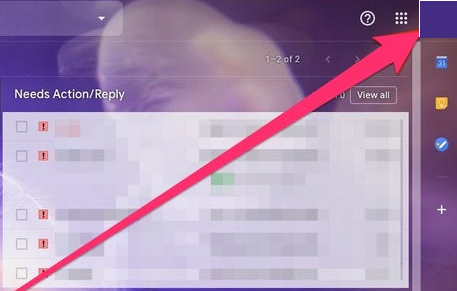
Related Post: How to Check Chrome Version
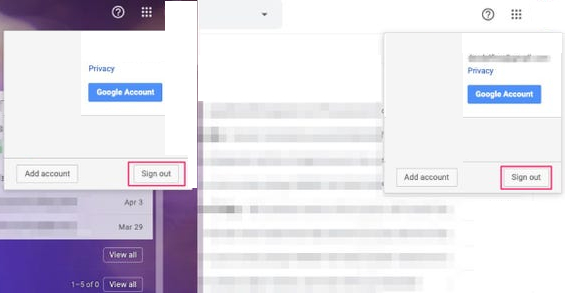
- Tap on log out to logout from this account. Also, log out from any other Google account.
- Then, sign in again with the account you want to prioritize and set as the default account.
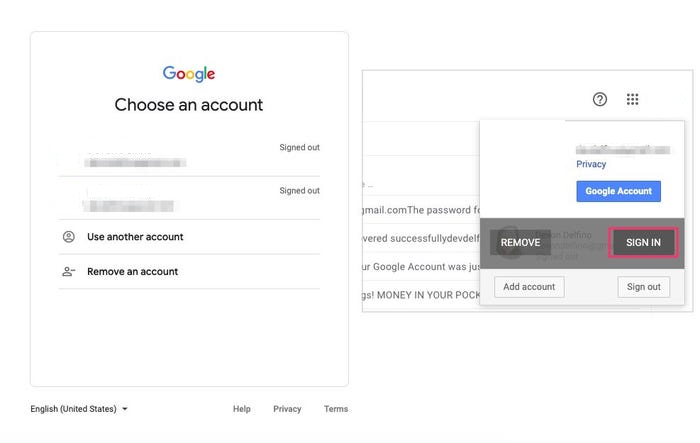
- Now, you can log in again to your other accounts.
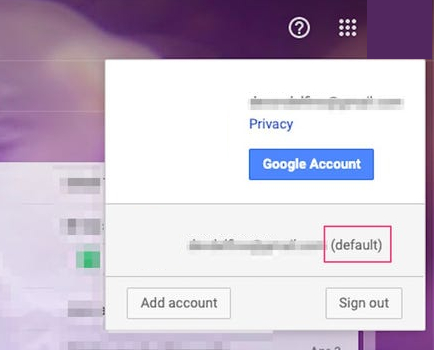
- Click your profile picture icon that appears in the top right corner to verify that your prioritized account is now set as a default google account. Once the Account is set as default, clicking on the profile icon will list an email address and a round bracket next to the email display (default).
You can easily get your job done by signing in this way. You can sign in to your other accounts without making any changes. However, your default google account varies from device to device so if you want to change your default account in other devices you have to change in each device separately.
This is what Google has to say on their supports page:
“In many cases, your default account is the one you signed in with first. On mobile devices, your default account can vary depending on your device’s operating system and the apps you use.”
Bonus Tip: How to manage Multiple Google account
By reading the above article now you can easily use switch account features. But there are many other problems that you may encounter time by time for Multiple accounts in google. Singing into your default account first then onto another account is a good trick for sure but easy switching makes it more convenient. There is a chance you may attempt to open a shared link but a google message pops up stating that you do not have permission to access that link. You can manage your Google account and save some clicks just by following these easy steps.
- You can sign in with three accounts in Google Backup & Sync. Now you have to choose your preferred account and then change the location of the Google drive folder of each account so that it never intersects.
- You can use different accounts for different google chrome profile.
- Use different Chrome extensions in order to log in with different google accounts on different sites.
- If you want to get temporary access to your account other than your default google account you can also open your email in incognito mode by pressing CTRL+Shift+n.
- If you are working on some email other than your default one and you want to use it after some break, do not logout. Whenever you get back to Google you will enter your account without the need to sign in again.
- Use a different profile image for each account so it will be easy for you to identify.
- Enter your accounts according to the priority so it will be easy for you to switch these accounts.
- You can use different Chrome profiles for different accounts like operating personal and work accounts with different extensions.
- You can also use a chrome extension like a session box for different logins.
NOTE!
Default Account
The account you are signed in, with your mobile is the default Google account for your mobile. If you are operating multiple accounts every day then google chrome extension is the best way for you for sure.
Related Post: How to Flip and Rotate an image in Google Docs!
I hope now you have an idea of how to change the default google account and how to manage multiple Google accounts. If you have any query or you want to share your experience you can share in the comment section below
