
Close Menu
Tech In Pack
  • Business
  • Digital Marketing
  • How to
  • Tech Updates
  • Trends

Subscribe to Updates

Subscribe to get tips, tricks, news related to Gadgets, social media platforms and much more.

What's Hot

How Data-Driven Decisions Are Shaping Amazon PPC Campaigns

Apr 29, 2026

Latest Breakthroughs in Quantum Computing 2024: A Simple and Detailed Guide

Apr 26, 2026

Why Creative Writing is Essential for Primary School Children

Mar 26, 2026
Facebook X (Twitter) Instagram
Tech In Pack
Contact Login
  • Business
  • Digital Marketing
  • How to
  • Tech Updates
  • Trends
Tech In Pack
  • Home
  • How to
  • Trends
  • Tech Updates
Home»How to»Streaming Platforms»How to View SPOTIFY HISTORY On Mobile and Desktop App
Streaming Platforms

How to View SPOTIFY HISTORY On Mobile and Desktop App

Usama SarfrazBy Usama SarfrazAug 15, 2020Updated:Feb 17, 20234 Comments4 Mins Read
Facebook Twitter Pinterest LinkedIn Tumblr WhatsApp VKontakte Email
How to view Spotify history
How to view Spotify History or Mobile or Tablet.
Share
Facebook Twitter LinkedIn Pinterest Email

Spotify is a freemium audio streaming platform. Its basic features are free with advertisements and automatic music videos, while advanced features like offline listening and commercial-free listening can be acquired via paid subscriptions. It is a great way to discover and listen to some outstanding songs and podcasts. On Spotify users listened to many songs, and it is possible that you have discovered a great song and after some time you want to listen to that song again but you forgot the details. Don’t worry, it is possible to view your play history. Spotify offers a Spotify play history feature that allows you to rediscover the last 50 songs you have listened to in the past. In this article, you will discover how to view Spotify history.

2 Best ways to view Spotify listening history:

You can easily view the song’s history you have enjoyed before with the Play History feature within just a few clicks. There are different alternatives to view Spotify history, 1 is for desktop or web and the other is for mobile phones or tablets.

1. How to view Spotify history on Desktop App

If you are wondering how to view Spotify history or you can say Spotify listening history on Desktop App. However seeing the Spotify listening history on Desktop App is much more simpler.

Below are some easy to follow steps that can enable you to view Spotify play history on Desktop or Web player.

  • First, log in to your Spotify account.
  • Head to the bottom right corner on the Spotify home screen

How to Delete Spotify Account : Cancel Spotify Premium

  • Now, tap on Play Queue. ( here you can add or remove or change the order of future songs to be played)
Play que
  • Then tap on History appears at the top.
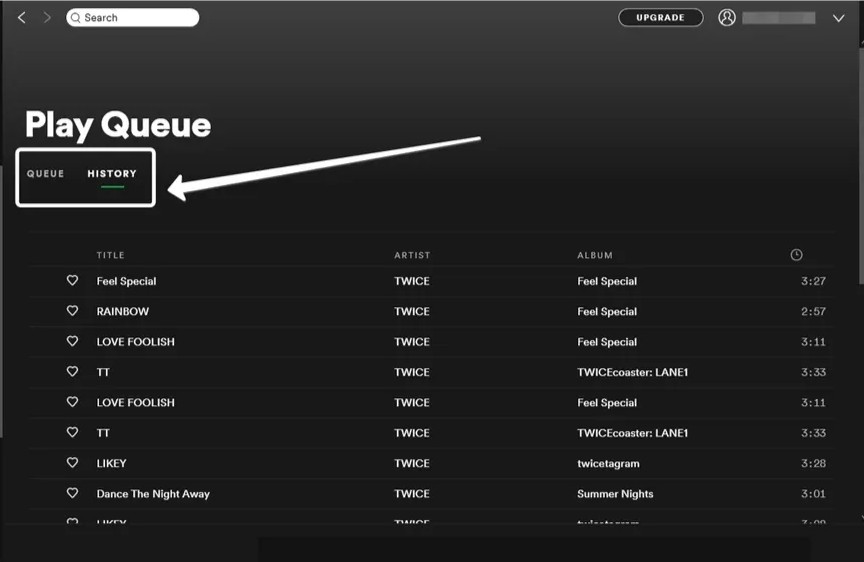
History

Now, you will see the list of last 50 songs you have listened. Go through that list and find the song you want to listen again.

2. How to check Spotify history on Mobile

If you are using Spotify on your mobile or tablet, you can’t find history features as easily as in desktop mode. However, it does not means that you can’t view Spotify history in the Spotify app. Follow the steps given below:
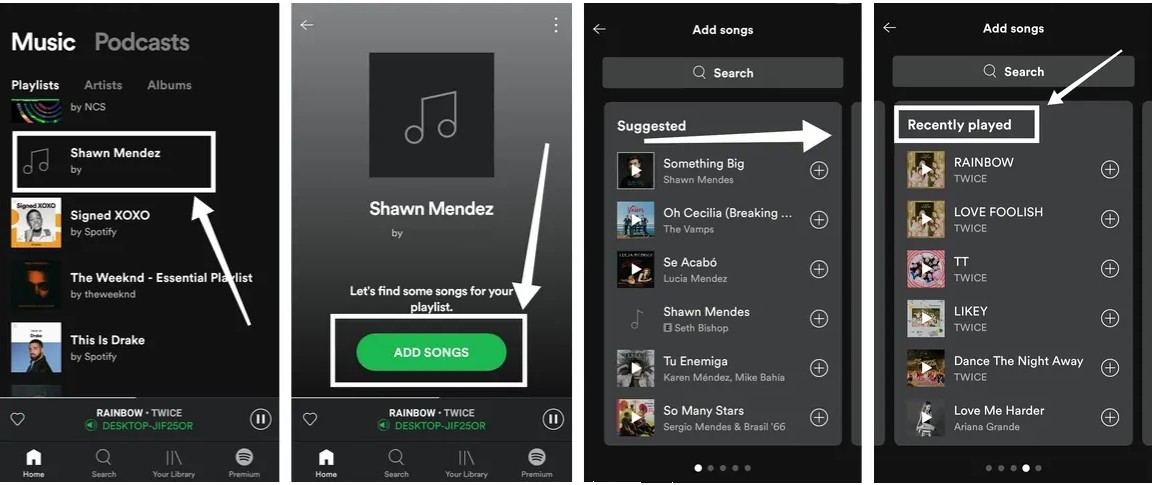
How to check Spotify history for Mobile or Tablet
  1. First login to your Spotify account.
  2. Click on the already created playlist.
  3. Now click on add songs.
  4. Swipe left and here is your recently played tracks.

Here you can see the songs already present in the playlist. You can also add songs to the playlist or note down their titles so you can find them again later simply by using the search option. For this

  1. Head to the bottom of your mobile screen and tap Now Playing on your Spotify app.
  2. Swipe left on the home screen
  3. Right-click on the track.
  4. Now tap on Add Queue.
  5. Now add songs to the playlist.

Find Recently Played songs on Spotify:

It happens with all of us that we find some song much interesting but forgot to add it in our playlist or favorites. If it happens with you too, and you want to find that song, you are at the right place then as we got a simple trick to locate recently played songs on Spotify. Below are the steps listed to find recently played songs on Spotify:

  1. Swipe left on your home screen.
  2. Now you will see the playlist.
  3. This playlist will list down the last songs you have played.

It’s a very useful feature when you forget the songs you played recently. I hope now you can discover those songs that you want to listen but forgot the details. If still you face any problems in doing this you can share your query with us in the comments section below.

Find Recently Played Playlist on Spotify How to check Spotify history for Mobile How to check Spotify history on Desktop Spotify history
Share. Facebook Twitter Pinterest LinkedIn Tumblr WhatsApp Email
Previous ArticleHow To Flip An Image In GOOGLE DOCS? Ultimate Solution!
Next Article How To Strikethrough in GOOGLE Docs: Updated Easy Guide
Usama Sarfraz

Usama Sarfaraz is a technology writer with a passion for exploring the latest social media platforms and sharing hacks and tricks to help readers make the most of technology. With years of experience in the tech industry, Usama has developed a keen eye for emerging trends and an in-depth understanding of how technology is shaping our world. As a writer, Usama brings a fresh and engaging perspective to his articles, making complex topics accessible to readers of all levels. He specializes in how-to guides for popular social media platforms such as Facebook, Twitter, Instagram, and TikTok, as well as providing insights into the latest software and apps. Whether you're a social media newbie or a tech-savvy user looking to stay up-to-date with the latest trends, Usama's writing is sure to provide you with the knowledge and insights you need. So, if you're looking to unlock the full potential of your technology and stay ahead of the curve, be sure to check out Usama's latest articles and guides.

Related Posts

Dumpor: View and Download Instagram Content Anonymously

Nov 2, 2023

Blooket/Play: Ultimate How-To Guide For Teachers

Oct 10, 2023

5 Ways To Share Files With Your Team While Working From Home 

Sep 30, 2023

How to change SPOTIFY Username and Display name (2023)

Apr 13, 2023
Leave A Reply Cancel Reply

You May Like

How To Strikethrough in GOOGLE Docs: Updated Easy Guide

Aug 18, 2020

Enhancing Regression Testing: Strategies for Continuous Improvement

Feb 19, 2024

How to Rename AirPods on iPhone, Mac, and Android

Jun 6, 2023

Snoopza Free Keylogger for Android: Navigating the Maze of Surveillance and Security

Aug 30, 2023
Advertisement
About Us

Get some tech updates, tech hacks, reviews, and buying guides for tech products, services, and applications.

Contact: worldmusti@gmail.com

Our Picks

How Data-Driven Decisions Are Shaping Amazon PPC Campaigns

Apr 29, 2026

Latest Breakthroughs in Quantum Computing 2024: A Simple and Detailed Guide

Apr 26, 2026

Why Creative Writing is Essential for Primary School Children

Mar 26, 2026
Popular

Top 5 Best Android Phone Locator Apps

May 31, 2020

8 WAYS TO BOOST ANDROID MOBILE’S SPEED

Jun 2, 2020

iOS 13.5.1: Apple’s update to prevent jailbreak by unc0ver

Jun 4, 2020
Facebook X (Twitter) Instagram Pinterest
  • Home
  • How to
  • Contact Us
© 2026 ThemeSphere. Designed by ThemeSphere.

Type above and press Enter to search. Press Esc to cancel.

Go to mobile version

Sign In or Register

Welcome Back!

Login to your account below.

Lost password?