


A Large number of Apple users use iCloud as the main storage place for their digital world, it includes everything from photos to contacts. Just like any type of storage system. Accidents do happen, we may experience loss of images for many reasons, such as attack of the virus, damage to the device, failures of jailbreak, accidentally deleting all images, and many more. So, In order to avoid these kinds of circumstances you need to create a backup. In this article, you will learn how to recover deleted photos from iCloud.
If you are an Apple user, iCloud makes this possible. Apple allows you to back up your Apple devices using iCloud. iCloud has many other interesting features too. You can share your pictures and music and many other important documents with anyone you want using iCloud. If you’ve backed up your photos to iCloud, fortunately, you can recover any deleted photos from an iCloud backup file.
We may experience the loss of images for many reasons, such as a virus attack, damage to the device, failures of jailbreak, accidentally deleting all images, and many more. To avoid these kinds of circumstances, you need to create a backup using the best cloud storage solutions. In this article, you will learn how to recover deleted photos from iCloud.
There are several different ways to recover an iCloud backup or your deleted photos from your iCloud depending on where you have deleted your photos or whether you have enabled iCloud photos or not. Let’s proceed with this.
Restore Photos when iCloud photos are enabled
Method 1: Recover deleted photos without a third-party app
If you want to check whether iCloud photos are enabled or not, head to settings, click on your name, now tap on iCloud, then tap photos. Now check whether the iCloud photos toggle is on or off. ICloud contains the recently deleted album. Besides, if you have deleted your photos within a period of 1 month then it is very easy to recover an iCloud backup of those photos without using a third-party app.
Follow these easy steps if your problem falls into this category.

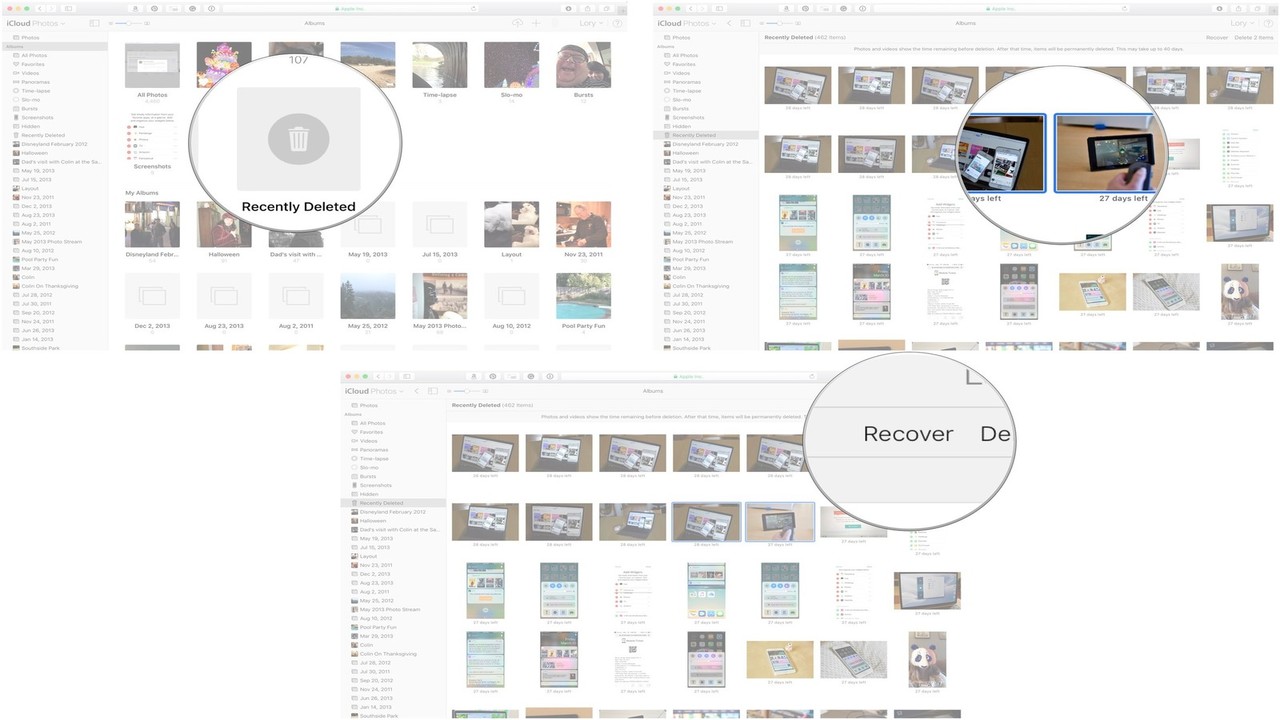
- Head to iCloud.com and sign in using your iCloud email and password
- Tap on the Photos.
- Now Click on the albums that appear at the top.
- Tap on the photos you want to restore.
- Now click on Recover
Related Post: How to Recover Data after Factory Reset.
Related post: How to restore deleted WhatsApp messages without backup.
Method 2: Recover deleted photos Using third party app
(a) Syncios iPhone Data Recovery
Syncios iPhone Data Recovery is a very powerful and helpful tool that supports retrieving many contents from iCloud backup ranging from Photos, Videos, WhatsApp messages, important documents, and much more. This app is available free on the Apple app store. Moreover, it is compatible with each and every iPhone model be it the latest one or the oldest one.

Follow these easy steps to recover iCloud backup or your deleted photos.
- Download this app on your pc first from www.syncios.com
- Then tap on Recover from iCloud Backup File
- Choose the only backup file for the device that you have already synced with.
- Now click Start Scan.
- When the scanning process is all done, now you can see all contents of the iCloud backup file like photos, WhatsApp messages, etc.
- Now tap on the camera roll below the photos and videos head
- Now all photos will show, select those pictures that you want to recover, then tap on Recover.

(b) How to Recover photos without iOS device
If for any reason your iPhone or iPad is damaged, or somebody steals it from you, don’t worry, you can still find your photos using PanFone Data Recovery. PanFone Data Recovery is one of the most reliable and trusted tools which allows you to retrieve your permanently lost videos, photos, documents, and much more.
Follow these easy steps to implement how to recover deleted Photos from iCloud.
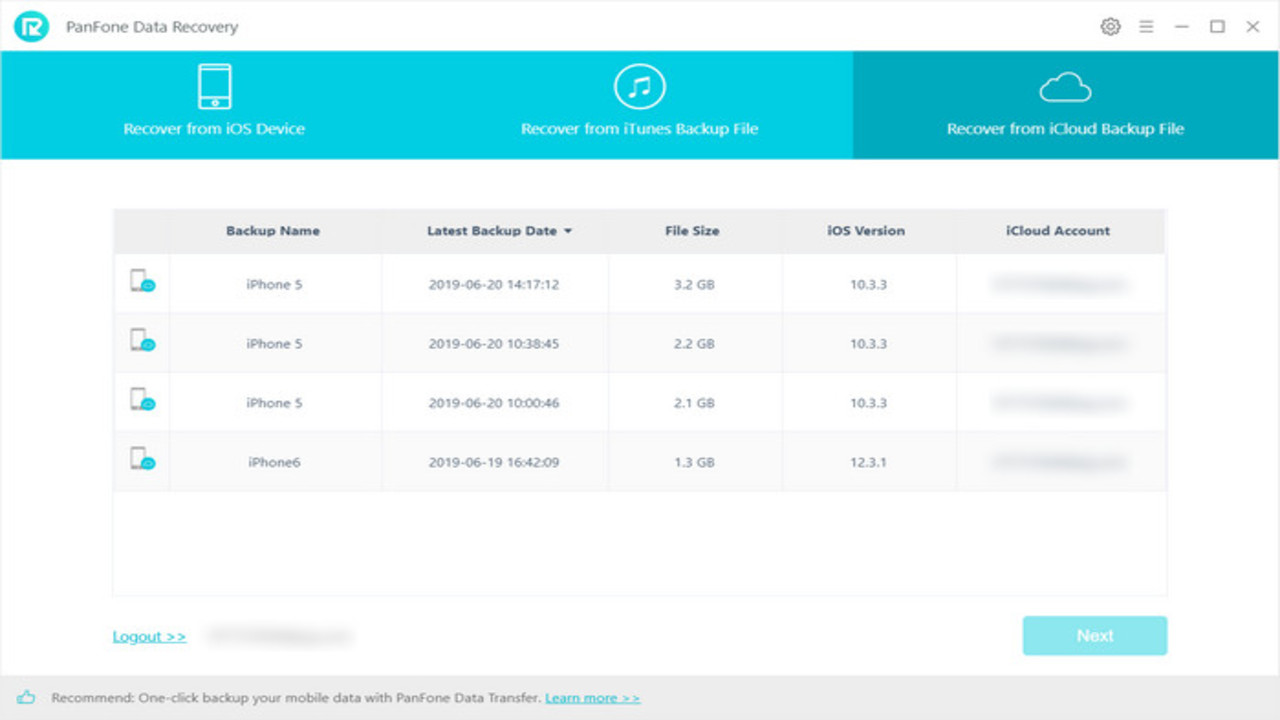
- First, install PanFone Data recovery on your PC from www.panfone.com
- Now tap sign in and tap on Recover iCloud from a backup file
- Now different backup files will be listed and shown
- Select the one you want to get access to
- Tap on next and simply tick on the files you want to download
- After completion of the download start scanning to extract the files
- Now every content in detail will be displayed
- Select those which you would like to recover
- After the download process tap on next to extract the backup file quickly.

Related Post: How to change your iPhone Name
Recover deleted Photos when iCloud Photos is disabled
If this is the case that you have not enabled iCloud Photos, don’t worry there are still some ways to recover your photos. Even if your photos are gone for good from every apple server still there is a chance that they might be stored in a third-party backup somewhere on your PC. A tool made by Copytrans is very helpful for you in this situation, this tool runs an automatic backup search on your pc and lists down each and every backup they found on your pc. This app helps you to find iCloud or any third-party backup and extract it to your Pc. Follow these easy steps to recover your deleted photos.

- Download CopyTrans Backup Extracter from Copytrans.net
- Install and run the program
- Now wait until the program completes the Automatic backup hunt
- After completion, it will list down and display the backups it hunts in your pc
- Select the backup you think contains your photos
- Enter the password if it is encrypted

- After your confirmation list of all data types this backup contains will show
- Now tap on Photos and click on extract
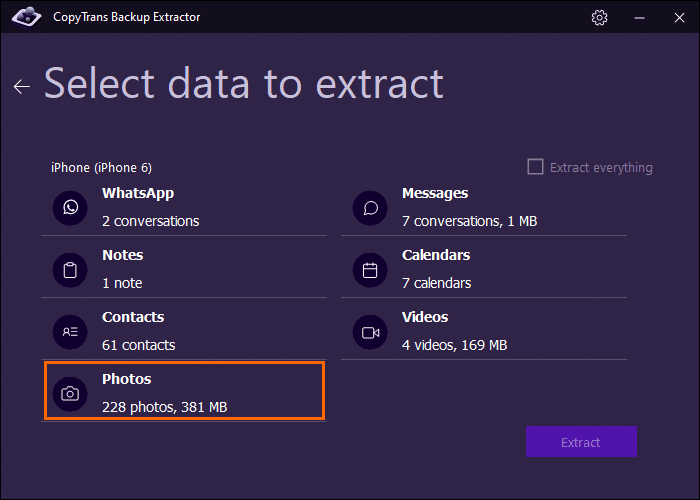
- Now select the folder you want your photos to be extracted in.
Related: How to factory reset iPhone
Recover deleted photos on Mac
Having the latest version on mac, you can quickly restore your deleted data like photos and files.
1. open the photo app or gallery on your mac.
2. scroll down until you see the app’s recently deleted photos or recovery files. The current software update will show you the deleted files in a sidebar.
3. select the photos in multiple selections to restore them to the internal storage.
4. now, recover the photos into an album of your choice.
5. if you have a backup on your laptop, you can visit the time machine from the settings option. It will recover your file instantly. If you do not have a backup, it is fewer chances to restore past pictures or file.
I hope now you have a clear-cut idea of how to recover deleted photos from iCloud or how to recover iCloud backup. If you know any other method or you are facing any problems in recovering your deleted photos mention it in the comment section below.
FAQs
According to the terms and conditions on iCloud, you can get your files back to the internal storage within 30 days of deletion. Otherwise, there is no way to get it back with any technical app. Yet, keeping a backup on your device can save your files from permanent removal.
You can use your passcode or face id to access recently deleted files. Once it is unlocked, select the pictures you want and tap on recovery.
If you are finding how to recover deleted photos from iCloud, you should go to the recovery file. The recovery file will contain all the last 30 days’ data which iCloud can recover thoroughly.
