Close Menu
Tech In Pack
  • Business
  • Digital Marketing
  • How to
  • Tech Updates
  • Trends

Subscribe to Updates

Subscribe to get tips, tricks, news related to Gadgets, social media platforms and much more.

What's Hot

How Data-Driven Decisions Are Shaping Amazon PPC Campaigns

Apr 29, 2026

Latest Breakthroughs in Quantum Computing 2024: A Simple and Detailed Guide

Apr 26, 2026

Why Creative Writing is Essential for Primary School Children

Mar 26, 2026
Facebook X (Twitter) Instagram
Tech In Pack
Contact Login
  • Business
  • Digital Marketing
  • How to
  • Tech Updates
  • Trends
Tech In Pack
  • Home
  • How to
  • Trends
  • Tech Updates
Home»How to»Streaming Platforms»How To Delete SPOTIFY Account – A Complete Guide (2023)
Streaming Platforms

How To Delete SPOTIFY Account – A Complete Guide (2023)

Usama SarfrazBy Usama SarfrazSep 16, 2020Updated:Feb 17, 2023No Comments5 Mins Read
Facebook Twitter Pinterest LinkedIn Tumblr WhatsApp VKontakte Email
how to delete Spotify account
how to delete Spotify account and how to cancel Spotify premium
Share
Facebook Twitter LinkedIn Pinterest Email

Spotify is one of the most followed music streaming services, offering access to over 30 million songs online. On Spotify, about 71 million paid users and 160 million used the free ad-supported service. It offers add-funded free as well as $ 9.99-month premium subscriptions. This Offer sounds good, but it might be the case that your usage is not justifying the charges. Or you might have discovered some other competing services like Apple Music, Tidal, and Amazon Music. But how to delete Spotify account?

However, in any scenario, if you don’t want Spotify any longer, you can easily delete the Spotify account within just a few clicks. Note that you can also cancel your subscription without deleting the Spotify account entirely. Also, you can revert back to the free service. If you choose to cancel your subscription, you’ll not lose your playlists, followers, and music you have saved in the library, but with the caution that you will have to listen to ads. In this article, you will get to know how to delete Spotify account and how to Cancel Spotify Premium.

For this, you have to use a web browser on your mobile or Pc, as there is no option available in the Spotify app. Before deleting your account, keep in mind the implications. Once you have deleted your account, you will not be able to access your existing username, playlists, followers, and also the music you have saved to your library. However, you can use the same email to create a new Spotify account.

How to delete Spotify Account

If you find that there is no need for Spotify in your life for any reason or you are no longer using Spotify anymore, then you should know to delete Spotify Account. You can only delete your Spotify by visiting Spotify Website on any of internet browser, not from Spotify App on your mobile phone. Follow these easy and quick instructions to know how to delete Spotify account.

If you want to see your Spotify history before deleting the account read How to view Spotify History On Mobile and Desktop app

  • Head to Spotify’s Contact customer Support page
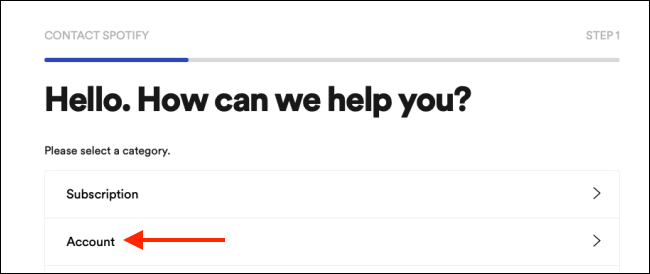
Head to Spotify’s Contact customer Support page
  • Now, click the “Account” Option.
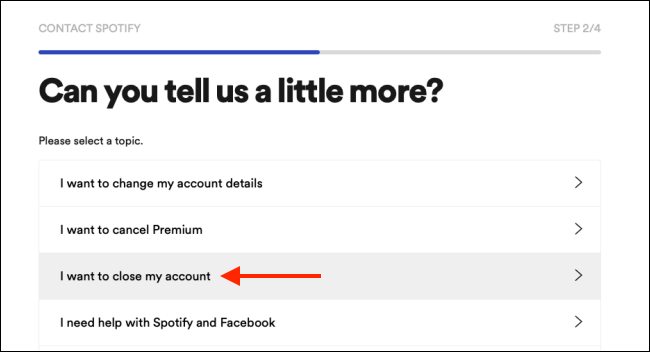
  • Tap on “I want to close my account”.
Tap on "I want to close my account".
  • Now click the “Close Account” option, which appears on the left of the screen, to start the deletion process.
Tap on "I want to close my account".
  • Now you will see a popup window that says “We feel sad that you want to leave us” and it begins the procedure to close your Spotify account in 5 steps.
  • Tap on the “Continue” option, appears on the lower-left corner, so you can continue after each step.
  • The first step asks you to Validate that you want to delete your Spotify Account permanently.
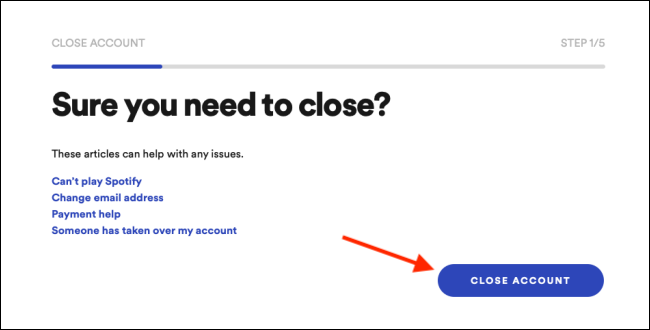
Validate that you want to delete your Spotify Account permanently.
  • Now, verify that you are logged into the correct account by clicking on the blue “Continue” option.
verify that you are logged into the correct account by clicking on the blue "Continue" option.
  • You’ll see a warning from Spotify in step 3, that you’ll no longer access your playlists, follower, and the music saved in the library.
  •  Now check the “I Understand” box to agree that you recognize the concerns, and click on the continue option.
  •  On the next page tap on “Continue” again.
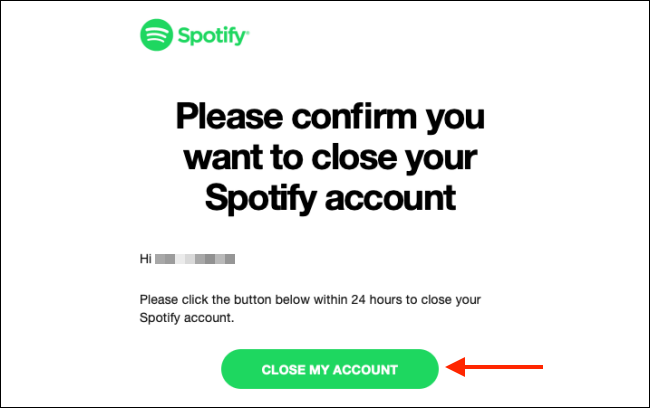
  •  Check the email on the account, you have registered Spotify with.
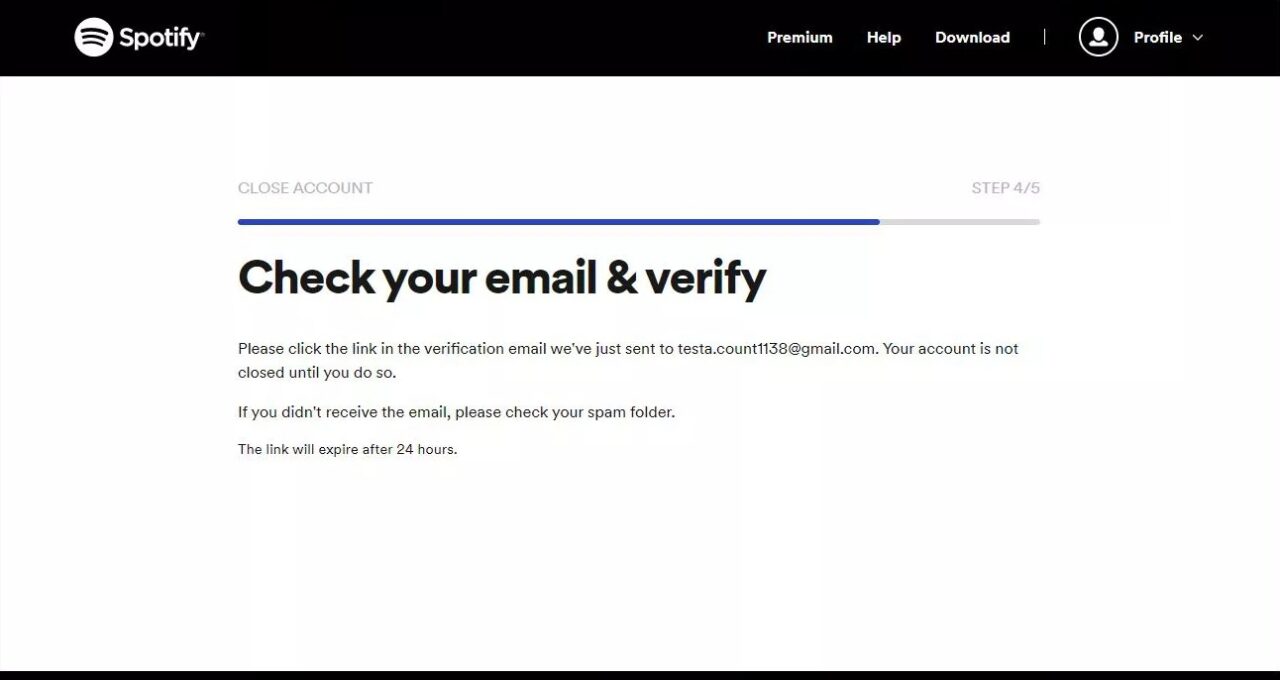
  •  Click on the received link, and click on the Close “My account” option.
  • Now you’ll see a green button, click it within 24 hours of receiving email.
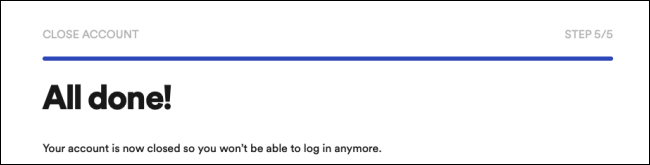
Note!

Recover the Spotify Account

Once the account is deleted you can get it back within 7 days of deletion, otherwise it would be gone FOREVER!

How to Cancel Spotify Premium

Once you cancel Spotify premium Subscription, it automatically reverts to a freemium account that no longer needs any additional charges. In this freemium facility, you will have access to the same playlists, and music. But with advertisements popping up in between the songs. There might be many possibilities that push you to cancel Spotify premium. Maybe you lose interest in music or you find another great app to get your account replaced. Or you don’t find any time to justify the spending you made on the premium version. The reason could be any, but if you have already decided to undo your decision of using a premium account or if you want to cancel your paid Spotify subscription, Follow these simple and quick guide to do so:

  •  Sign in to your Spotify account and click on your name on the top right, then click on account.
How to cancel spotify premium
  •  Click on the Subscription option, on the account’s page.
How to cancel spotify premium
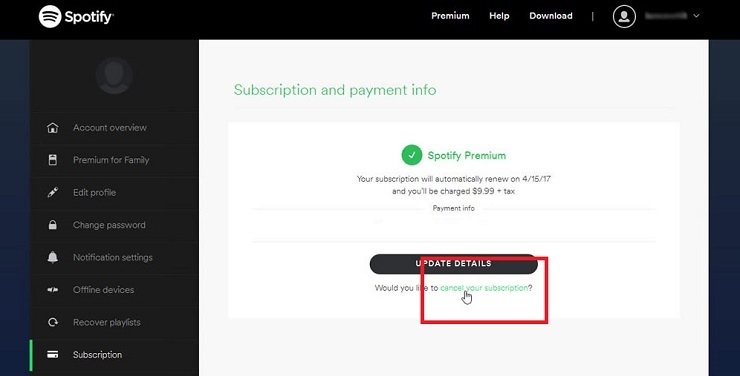
  •  To cancel your subscription click the link on the subscription and payment info page.
How to cancel spotify premium
  •  Spotify inquires about why you want to cancel your subscription. Click on the appropriate response, and then click Continue.
  •  You’ll see another page in rejoinder to the reason you identified. Click on the link at the bottom of the page.
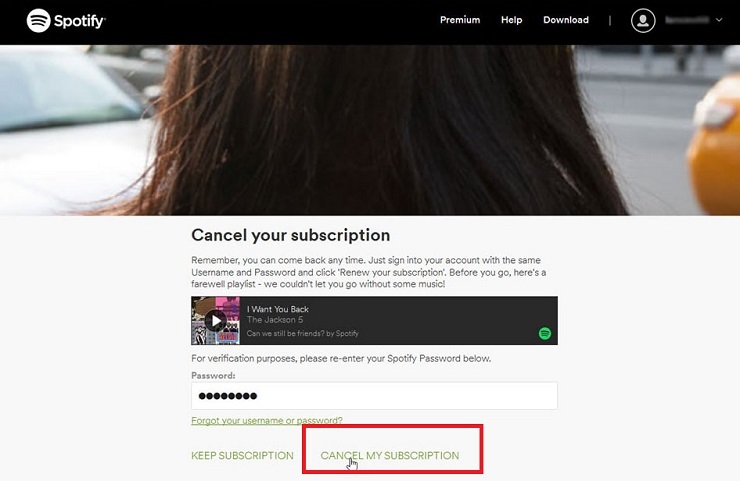
  •  Now, enter your password and click on the unsubscribe option.
How to cancel spotify premium

Now, the paid Spotify subscription is finally canceled. However, you still have the free version access.

How to recover back Spotify Account?

Spotify makes the deletion process a bit lengthy, as they want to make you sure that you actually want to end the Spotify Subscription, still, if you have changed your mind about Spotify deletion, you can have it back within 7 days period. When you delete the account Spotify sends you a confirmation email, including the reactivation Link. If you click on that link within seven days of deleting your account, you can have the option to get your account back.

What is the difference between Spotify Premium and Freemium Account?

The major difference is that the premium account does not include any advertisements while using the Freemium account you will experience advertisements in between songs.

Cancel Spotify Subscription Delete Spotify Account How to Cancel Spotify Premium How to Delete Spotify Account:
Share. Facebook Twitter Pinterest LinkedIn Tumblr WhatsApp Email
Previous ArticleHOW TO DOUBLE SPACE IN WORD Using Different Tricks?
Next Article HOW TO EDIT A PDF FILE (Top 10 Free Online PDF Editors)
Usama Sarfraz

Usama Sarfaraz is a technology writer with a passion for exploring the latest social media platforms and sharing hacks and tricks to help readers make the most of technology. With years of experience in the tech industry, Usama has developed a keen eye for emerging trends and an in-depth understanding of how technology is shaping our world. As a writer, Usama brings a fresh and engaging perspective to his articles, making complex topics accessible to readers of all levels. He specializes in how-to guides for popular social media platforms such as Facebook, Twitter, Instagram, and TikTok, as well as providing insights into the latest software and apps. Whether you're a social media newbie or a tech-savvy user looking to stay up-to-date with the latest trends, Usama's writing is sure to provide you with the knowledge and insights you need. So, if you're looking to unlock the full potential of your technology and stay ahead of the curve, be sure to check out Usama's latest articles and guides.

Related Posts

Dumpor: View and Download Instagram Content Anonymously

Nov 2, 2023

Blooket/Play: Ultimate How-To Guide For Teachers

Oct 10, 2023

5 Ways To Share Files With Your Team While Working From Home 

Sep 30, 2023

How to change SPOTIFY Username and Display name (2023)

Apr 13, 2023
Leave A Reply Cancel Reply

You May Like

How To Highlight In Google Docs By Using Google Chrome?

Nov 16, 2021

Latest Breakthroughs in Quantum Computing 2024: A Simple and Detailed Guide

Apr 26, 2026

Spanish D 94: Exploring Its Meaning, Significance, and Online Impact

Mar 15, 2024

The Benefits of Vestibular Therapy for Patients with Anxiety Disorders and Vertigo

Feb 22, 2024
Advertisement
About Us

Get some tech updates, tech hacks, reviews, and buying guides for tech products, services, and applications.

Contact: worldmusti@gmail.com

Our Picks

How Data-Driven Decisions Are Shaping Amazon PPC Campaigns

Apr 29, 2026

Latest Breakthroughs in Quantum Computing 2024: A Simple and Detailed Guide

Apr 26, 2026

Why Creative Writing is Essential for Primary School Children

Mar 26, 2026
Popular

Top 5 Best Android Phone Locator Apps

May 31, 2020

8 WAYS TO BOOST ANDROID MOBILE’S SPEED

Jun 2, 2020

iOS 13.5.1: Apple’s update to prevent jailbreak by unc0ver

Jun 4, 2020
Facebook X (Twitter) Instagram Pinterest
  • Home
  • How to
  • Contact Us
© 2026 ThemeSphere. Designed by ThemeSphere.

Type above and press Enter to search. Press Esc to cancel.

Go to mobile version

Sign In or Register

Welcome Back!

Login to your account below.

Lost password?