


Facebook is one of the largest social media networks having millions of users. Millions of users stay connected using Facebook Groups. Although Facebook groups are valuable and useful and have tremendous sharing potential. But there are lots of reasons you might consider deleting your Facebook group. Maybe your friends stop using Facebook groups or you think you are spending too much time on this platform or things are not going as planned, which is very common in the world of social media. However, it is important to understand that once it is deleted it can never be recovered. Here in this article, you will see how to delete Facebook group and how to archive a Facebook Group whether you have created your group recently or it is a classic one.
How to delete Facebook Group New One:
Before deleting Your Facebook group you have to notify members at least 1 or 2 days before so they can download the content they want. You can post an update stating your notice to delete the group.
You can easily delete the Facebook group simply by following these steps.
- Go to your news feed, now tap on Groups appears in the left menu then select the group you want to delete from Groups You Manage or by searching for it.

- Now tap on the Members below the group name.
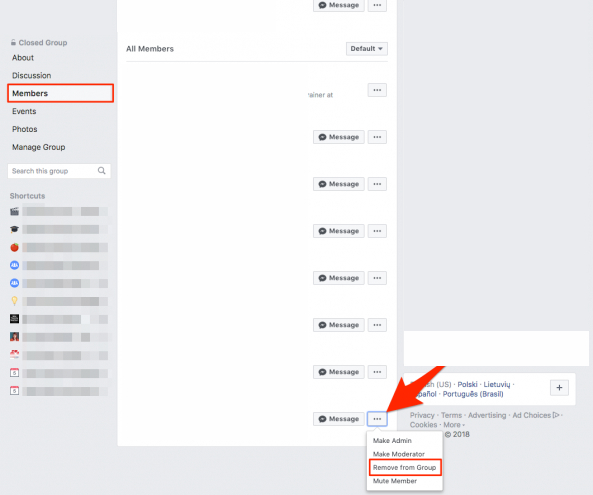
- Click three dots appears next to each member’s name, then select Remove member.
- Now tap on Confirm.
- Once you are done removing other members from your group, now click next to your name and tap on Leave the group.

Note: If you are not an original creator, you cannot delete a group that you have not created unless the original creator of a group leaves the group. Group members are not notified when the group is deleted.
RELATED POST: How to delete search history on Facebook Messenger
How to archive a Facebook group:
You can also archive your Facebook group if you want to take a break from this platform. As archiving is reversible. If in the future you have plans to restore the group activities you can un-archive the group.

- Go to your news feed, now tap on Groups appears in the left menu then select the group you want to delete from Groups You Manage or by searching for it.
- Now tap on the three dots that appear above the About section.
- Now choose the Archive group.
- Then, click Confirm.
Note: When a group is archived, it remains intact with all the existing videos and photos and existing members can still see group content. However, they can’t post, comment, or react. Also, the archived Facebook group will not appear in the search result and no new member can join the group. Existing group members are also notified when a group is archived.
Related post: How To Create a Poll On Facebook: Complete Guide
How to delete the Classic Facebook group.
- Go to your news feed, now tap on Groups appears in the left menu then select the group you want to delete from Groups You Manage or by searching for it.
- Now tap on the Members below the group name.
- Click three dots that appear next to each member’s name, then select Remove member.
- Now tap on Leave the group appears next to your name once you remove the other members.
- Now tap on Leave and Delete.
Note: If you are not an original creator, you cannot delete a group that you have not created unless the original creator of the group leaves the group. Group members are not notified when the group is deleted.
How to archive an old group:
- From the news feed, tap on Groups appears in the right menu.
- Now select your group.
- Tap on three dots that appear under the cover photo.
- Now, select the archive group.
- Click Confirm.
Also read: How To Tag a Business On Facebook For Brand Engagement
Alternative to delete a Facebook group
Do you know the shorter version of how to delete Facebook Group? Follow up the steps given below to wind up within seconds.
- Visit the group panel on your android phone.
- You will observe an info tab on the group panel with multiple options.
- Out of many options, select members. It will show the entire list of friends in your group. If you want to remove one friend, click on the right mouse to select remove the friend. That’s it! For removing everyone from the group, follow the steps for every friend.
- Removing friends from the list takes minimum time through multiple selections and releasing them all at once.
- Now, go back to the info tab and remove yourself from the group.
You can also pause the Facebook group by clicking on the Pause option.
Ending this topic on how to delete Facebook groups with a big thumbs up for your good luck. Follow up on all the steps thoroughly. We have discussed two ways of removing groups from Facebook. You can choose anyone according to your time and choice. More often than not, you can absolutely share your confusion related to this topic. We will try to deliver the best answer through means of communication. If you face any difficulty in performing these steps, you can ask your query or share your experience in the comments section below.
Have a great day ahead
