


Deleting your Netflix Account could sound weird to some people because Netflix is one of the best streaming apps or services among others like Amazon Prime, HBO Max, Disney+, etc. The number of people buying Netflix membership is increasing day by day. Also in lockdown due to Covid-19 and Quarantine people are diverted toward online streaming apps, particularly Netflix. Netflix has gained popularity because it has Movies and Series of almost every culture and genre. Continue Reading to find out how to delete your Netflix Account.
But it is a paid app and sometimes people run short of money or are going through some financial losses so they cannot afford Netflix at that time. Sometimes it is possible that people are no longer using Netflix and would want to delete their Netflix Subscription.
Also Read: How to view Spotify History On Mobile and Desktop app
Guide to Delete Account
Here is how Netflix members can delete their Netflix accounts or pause them for time being.
Just follow the steps below to alter your membership options:
Step 1:
Open your web browser and go to Netflix.com or just open your Netflix app and sign in.
Step 2:
Go to your profile icon and click the Accounts option.
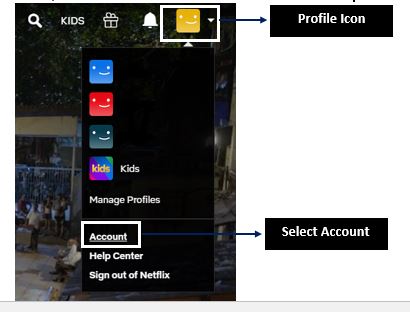
Step 3:
Under membership and billing, you will see two options. You can either “Cancel Membership” or “Pause Membership” according to your choice.
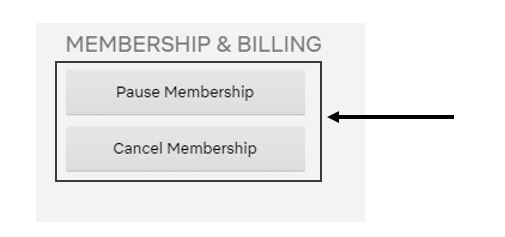
After clicking anyone option it will ask for confirmation and will either cancel your Membership permanently or Pause your membership for time being.
How to Delete your Account Through iTunes
This is only for iPhone users, people who have subscribed to Netflix through iPad or iTunes. To cancel your membership you have to:
- Go to your settings.
- Click your name or whatever name you have set in your iOS.
- Then go to iTunes and App Store.
- Click your Apple ID, if it’s not logged in, log in and then tap View Apple ID.
- Find the Subscription option and click it.
- Go to your Netflix Subscription.
- You can choose your current plan to change it, scroll down, and click “Cancel Subscription” to unsubscribe from Netflix.
Related Post: How to check if someone is using your Netflix Account
Cancel Your Netflix DVD Plan
Some people have Netflix DVD Plan also. No problem you can unsubscribe your DVD Plan.
- Simply go to your Account page and next to it click Plan Details.
- Just click “Cancel your DVD Plan” and confirm your selection.
Now you don’t have to be worried because of your financial issues or you want to save money for some of your important work. As you know how to Cancel Your Netflix Subscription. Either through your Web Browser or app. You also know how to delete it through your iTunes. So go and save your money if you are no longer using Netflix or have to save some money. After canceling your membership you don’t have to worry because your account will be deleted after some time automatically.
