


TikTok
TikTok is now one of the famous social networking apps. It is quite popular among teens and young adults. TikTok is an application where people make videos of themselves doing TikTok dances, or funny clips, dialogues, etc. So, it is quite a fun application for the teens and its users where they can spend several hours making TikTok challenge videos and TikTok dance videos. TikTok videos are also quite famous because of TikTok memes because memes are a great source of entertainment for everyone. And you can find many great TikTok memes in TikTok videos. But you will be wondering why we are writing this article on; How to Delete a TikTok Account. Well in the next few paragraphs you will find out.
Why Delete TikTok Account
While TikTok is a fun application there are some controversies revolving around TikTok. The allegations are mostly made by the U.S Government. The allegations include that China is using TikTok as a spy application. They also added it collects personal data; like pictures and TikTok videos that were deleted by users due to some censored content. So, it is quite risky having your personal data; or such images or videos collected by a website where it can be misused. Or worst if it falls into the wrong hands then we cannot even imagine how it will be used.
Related Post: How to make videos on TikTok

Some people are asking if TikTok shutting down due to all the controversies. Well, there are no signs of TikTok getting ban or even shutting down. Well, you can delete your TikTok account which will automatically delete your TikTok videos from your account.

Taking all these controversies into consideration; many parents are forcing their children to delete their TikTok accounts. Some teens or young adults who are mature enough are deleting their TikTok accounts themselves. Because it will automatically erase their TikTok videos from their accounts But some are facing difficulties while deleting their TikTok account. So, in this article, we will guide you step by step on How to Delete a TikTok Account.
Deleting a TikTok Account
Deleting a TikTok account is quite simple. Just follow the steps below and you can easily delete your TikTok account permanently.
- Firstly, open your TikTok App.
- Then, navigate to your Profile tab.
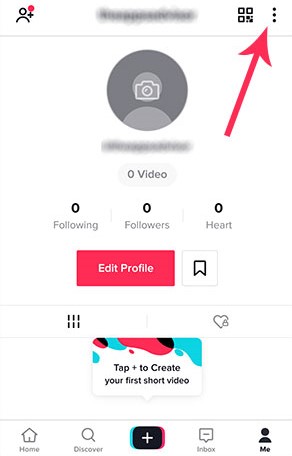
- Then, navigate to the settings icon on top right corner.
- After, selecting the settings option; you will be prompted to the page as shown in the image below.
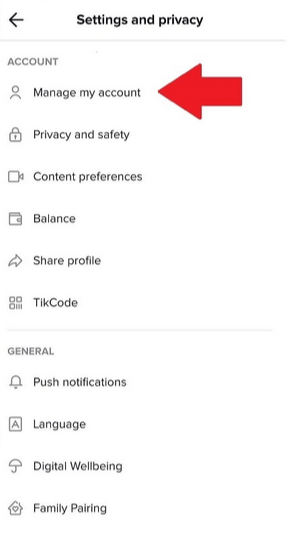
- Then, select the manage my account option.
- After, clicking on the manage my account option; you will be prompted to the image below.

- Then, select the option Delete Account as show in the picture.
- Lastly, you will be asked for confirmation about deleting your account. Shown in the image below.

- Lastly, select delete account.
Following the above steps will first deactivate your TikTok account for 30-days. In these 30-days you can also recover your TikTok account in case you change your mind. After 30-days your TikTok account will be deleted permanently.
RELATED POST: How to Delete Telegram Account
After Deleting TikTok Account
Once you have deleted your TikTok account now you can’t use that account to login to TikTok. You’ll no longer have access to the TikTok videos which you have posted. Also, you will access all the things which you have purchased; and you won’t get a refund on that. Another key important point is that other information which you have shared like text messages will still be visible to others.
Final Words
These are the steps that you can follow to permanently delete your TikTok account. TikTok can be used to view other people’s TikTok videos without an account. So, if you want to watch your favorite TikTokers. You can watch their videos without the need for an account.
Hopefully, with this article, we have cleared your queries on How to Delete a TikTok Account. If you know any other efficient method feel free to leave them in the comment section.
