


Snapchat is a popular social media platform that allows you to share photos, videos, and messages with your friends and family. Your username is your unique identifier on Snapchat, and it is how your friends find you on the app. If you’ve been using Snapchat for a while, you might have chosen a username that no longer suits you. Whether it’s too long, too difficult to remember, or simply not reflective of who you are now, changing your Snapchat username can be a great idea. In this guide, we’ll go over four different solutions to help you know how to change your Snapchat username.
How to Change Username on Snapchat :
In the current era, trends are driving the world, and an old username may not be deemed noteworthy. It is understandable to desire a catchy username to remain up-to-date with the current trends. When it comes to changing usernames, Snapchat’s policy is quite strict. It is not possible to change usernames more than once a year. This is because Snapchat links all the data, memories, and snap streaks to the username. However, there are some workarounds that can fulfill the purpose with no hustle.
Therefore, to make this tricky process simple, we have figured out five solutions to change your Snapchat username.
- Change Snapchat Username
- Change Your Snapchat Display Name
- Make a New Snapchat Account and User Name
- Change Snapchat Username using Email
- Snapchat ++
1. Change Snapchat Username
Step – 1: Open your Snapchat app and tap on your bitmoji in the top left corner of the screen.
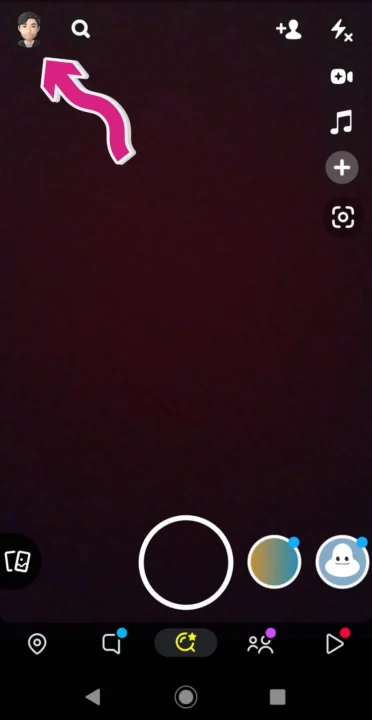
Step – 2: Tap on the gear icon in the top right corner of the screen to open the Settings menu.

Step – 3: Now, tap on “Username” under my account.

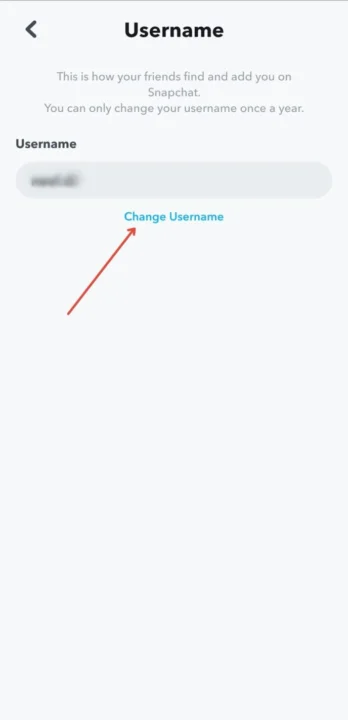
Step – 4: Tap on “Change Username”
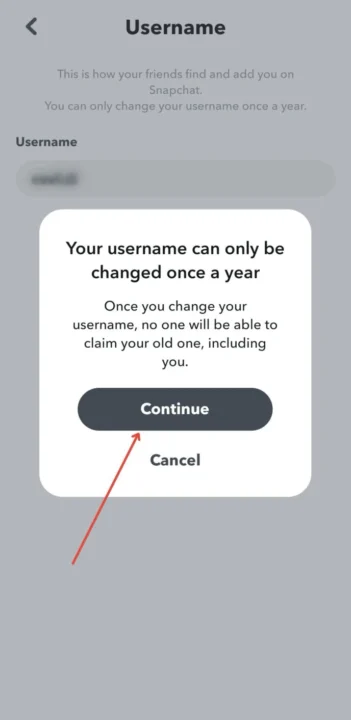
Step – 5: A prompt window will appear that notifies you, that username can only be changed once a year, tap on “Continue” to proceed.
Related Post: 37 Best Snapchat Hacks and tricks (2023)
2. Change Your Snapchat Display Name
Snapchat’s policy regarding display names is more relaxed. Users are allowed to change their display name as often as they want. Display names are not linked to any data, memories, or snap streaks, so changing them does not result in any loss of data. Snapchat also allows users to use emojis in their display names to make them more unique and expressive. As long as you have set your display name and saved it, it will appear in all your friends’ stories and chats instead of your Snapchat username.
Changing the display name is a task of some clicks and it hardly takes a minute or two (unless you take too much time in sorting the new name). Follow these easy steps to change your display name.
Step – 1: First, log in to your Snapchat account and tap on your tiny Bitmoji or profile icon which appears in the upper left corner of the screen.
Step – 2: Then, tap on the gear icon that appears in the upper right corner to head to settings. In the account settings the first, two account settings will appear, Name followed by user name.

Step – 3: Tap on the name.
Step – 4: Now, remove your existing display name, and In the Name text box, enter a new name.

Step – 5: Now finally, tap on the save button that appears when you are making changes to save them.
Once you are finished saving your display name, return to your profile and check the new display name that appears below the snap icon.
Also Read: Do you know how Snapchat makes money?
3. How to change Snapchat username with an email
This is the method in which you have to use an alternate Snapchat account created with a different email address to change the Snapchat username. Follow the steps below to know how to change the username on Snapchat.
- First, sign in to your Snapchat account.
- Now head to settings and locate sign out by scrolling down.
- Tap on the sign-out.
- Now select the signup option and fill in the asked details but use a different email address from the one with the current Snapchat account.
- Now, head to your profile and tap on add friends option.
- Then, wait a while after tapping the Continue button.
- Click on the OK button and enable Snapchat so that Snapchat can get access to your contacts.
- Login to your previous Snapchat account and head to its profile.
- Tap on My friends and select users then their username will appear on the popup screen.
- Add remaining friends.
- Now, again sign in to your new account, then add different accounts or add your username.
- Once you are done fixing these necessary changes, you can permanently delete the old account.
Related Post: How to unpin someone on Snapchat? Everything you need to know
4. Snapchat ++

This is one of the best and most comfortable known solutions in the Snapchat user community. This application allows you to change the username within Snapchat ++ and then return back to the original Snapchat application in place of this new user.
Related Post: How to Unblock Someone on Snapchat
Follow the step-by-step guide to change your Snapchat username:
- If you are using an iOS device then head to Settings, then tap on General and make sure Wifi or cellular data is on. This step has nothing to do with Android users.
- Search and tap on smoky. co.
- Now, search Snapchat.
- An option of Snapchat++ will appear.
- Tap on it to start and wait for some minutes.
- This app requires you to download some unnecessary applications and run them for about 30 seconds then Snapchat will be downloaded This requires downloading some unnecessary applications.
- Run it for a while, about 30 seconds, or do anything to do to meet the requirements, and Snapchat ++ will download.
- Open and log into your Snapchat ++ account and the option to change your username will be available to you.
Related Post: How to change streak emojis on Snapchat.
5. Make a New Snapchat Account and User Name
If none of the previous options work for you, you can consider creating a new Snapchat account with a different username. However, it’s important to note that you won’t be able to transfer any of your existing data or content to the new account. This means that you will have to manually add your friends to the new account, which can be a bit of a hassle. To make the transition smoother, be sure to save the information of your friends before deleting your old account. Then, follow these simple steps to create a new account and start fresh with a new username.
- First, log in to your Snapchat account by entering the login credentials.
- Now, tap on “Chat“, and then tap on “New Chat” in the upper right corner.
- Then, scroll down, to display the names of your friend in an alphabetical manner.
- Now, either take screenshots from the list or type each individual name of your friend.
- Then, cancel the new chat by tapping on the cross sign “X” in the upper right corner.
- Now, from the list search type the name of your friend.
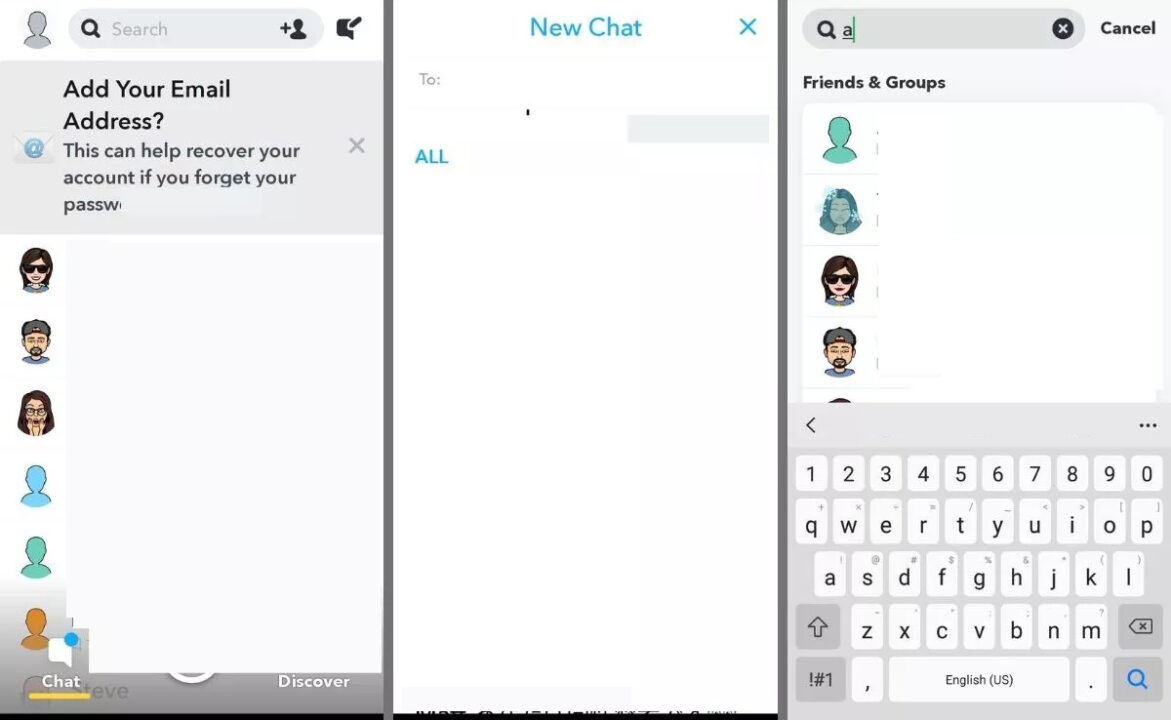
- Now, type the username that appears below the display name. Repeat this step to find the rest of your friends from the list.
- Then, select “X” in the upper right corner to exit Search.
- Now, tap on the tiny profile or Bitmoji icon.
- Then, tap on the gear icon in the upper right corner to access settings.
- Now, tap on the “Sign out” appears at the bottom of the settings menu
- Now, tap on the blue button to create a new account with your new username.
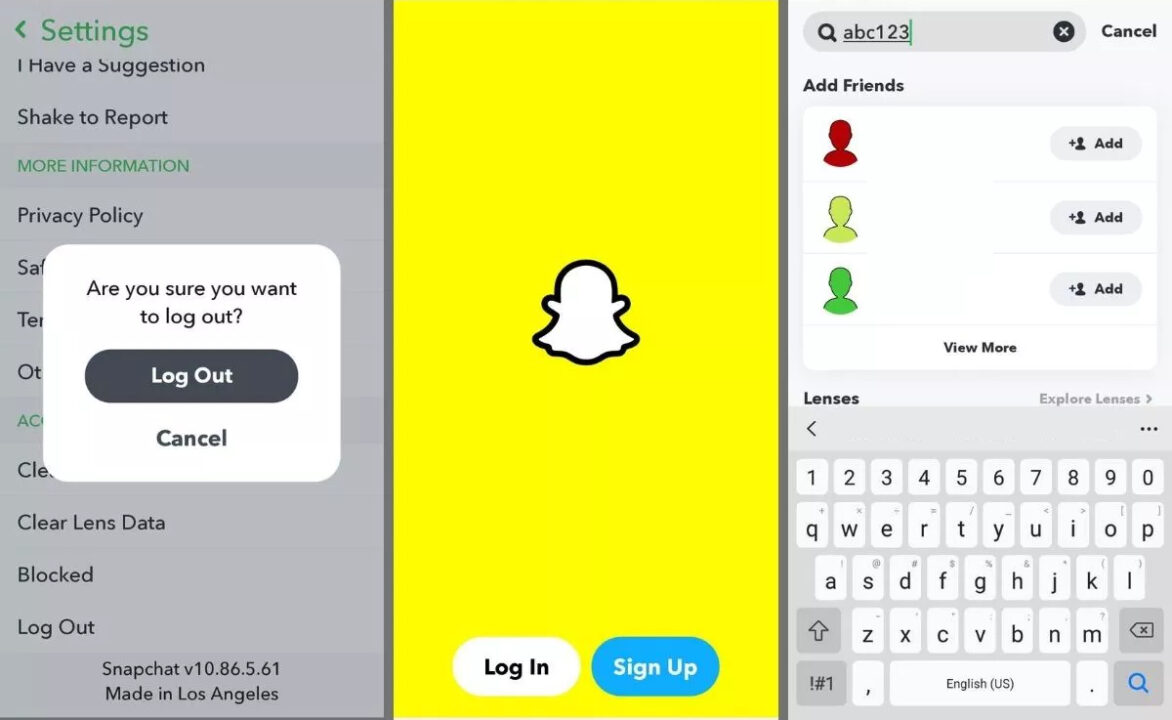
- After you have successfully created your new account, now search for your friends’ usernames by tapping on the magnifying glass icon.
- Now tap on + Add to add them.
Updated Policies to change display name vs username
Snapchat, like any other social media platform, has policies and guidelines for changing usernames and display names.
Snapchat Username Policies:
- You can change your username once a year. If you are with the old version of Snapchat, you might not be able to see this option of changing your name.
- All data, memories, and snap streaks are linked to the username, and changing it requires the creation of a new account.
- Users must create a new account if they wish to change their username, and all previous data will be lost.
- Offensive or inappropriate language is prohibited in usernames, and users may face account suspension or banning if they violate this guideline.
Snapchat Display Name Policies:
- Users are allowed to change their display name as often as they want.
- Display names are not linked to any data, memories, or snap streaks, and changing them does not result in any loss of data.
- Users can use emojis in their display names to make them more expressive.
Final Words:
Changing your Snapchat username is a simple process that can be completed in just a few steps. By following the step-by-step guide we’ve provided, you can change your Snapchat username in 2023 and keep your friends and followers up to date. So make sure to choose a username that you’ll be happy with for at least a month. If you encounter any difficulties in this process, please feel free to reach out to us by using the comment section provided below.
Faqs:
A: No, you can only change your Snapchat username once a year.
A: No, changing your Snapchat username won’t affect your snaps or messages. Your friends will still be able to see your old messages and snaps with your old username.
A: Yes, your friends will be able to find you with your new Snapchat username. However, if you have a lot of friends, you may want to let them know that you’ve changed your username so they can easily find you.
