
Close Menu
Tech In Pack
  • Business
  • Digital Marketing
  • How to
  • Tech Updates
  • Trends

Subscribe to Updates

Subscribe to get tips, tricks, news related to Gadgets, social media platforms and much more.

What's Hot

How Data-Driven Decisions Are Shaping Amazon PPC Campaigns

Apr 29, 2026

Latest Breakthroughs in Quantum Computing 2024: A Simple and Detailed Guide

Apr 26, 2026

Why Creative Writing is Essential for Primary School Children

Mar 26, 2026
Facebook X (Twitter) Instagram
Tech In Pack
Contact Login
  • Business
  • Digital Marketing
  • How to
  • Tech Updates
  • Trends
Tech In Pack
  • Home
  • How to
  • Trends
  • Tech Updates
Home»How to»Pc & Mobile»IOS»How To Delete Calendar Events On iPhone [UPDATED 2023!]
IOS

How To Delete Calendar Events On iPhone [UPDATED 2023!]

Usama SarfrazBy Usama SarfrazDec 17, 2021Updated:Jun 4, 20231 Comment4 Mins Read
Facebook Twitter Pinterest LinkedIn Tumblr WhatsApp VKontakte Email
How To Delete Calendar Events On iPhone
Share
Facebook Twitter LinkedIn Pinterest Email

Adding and removing events with the iPhone’s Calendar app is a convenient tool for managing your schedule. It makes you remember that you do not forget important dates such as birthdays, anniversaries, holidays, and special days. And what’s better, after you’ve added an event, such as a friend’s Birthday, you can designate it to be repeated regularly. But what about if you got some other important tasks to get reminded of and older events are no longer required? If you are wondering how to delete calendar events on iPhone, you are in right place. In this guide, we will demonstrate some easiest steps to help you delete calendar events on your iPhone.

How To Delete Calendar Events On iPhone?

Every year, the calendar event will serve as a reminder. Everything about this is fantastic. What happens, though, if you add or have an event that you no longer require? That’s not an issue. If you have searched for how to delete calendar events on iPhone, you land on the right page. On an iPhone, deleting calendar events is a simple process. Let’s have a look at how to go about it.

  • Open the Calendar app on your iPhone or iPad and schedule an appointment.
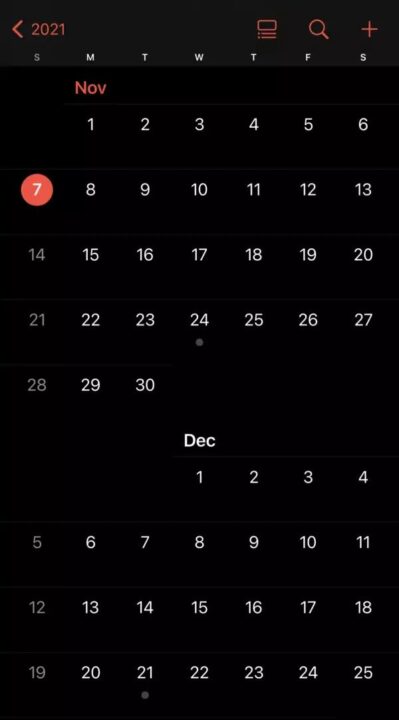
  • Please select the date that contains the event by tapping on it. The dates marked with a dot are the ones that have events scheduled.
  • Please select the event by tapping on its name.
  • Select Delete Event from the drop-down menu.
  • If it is any recurring event, you will have the opportunity to select between deleting this event just and deleting all future events in the future.

Do you know you can combine videos on your iPhone using these 5 Awesome tricks?

How To Get Rid Of An iOS Calendar Virus?

Also, fraudsters are attempting to display popups on websites, and when you click on them, you are automatically registered to their calendar, which has hundreds of repeated events. If you do not visit their website or use their service, you will receive a barrage of alerts. As a result, avoid clicking on any pop-ups on suspicious websites.

Your iOS device appears to be infected as a result of these calendar entries. However, they were not added to your calendar by a virus, and your device is not affected as a result. You may have unintentionally subscribed to a spam calendar mistake if you are receiving unsolicited calendar invites or event alerts. If this is the condition with you, you can unsubscribe from the calendar and erase the calendar you have subscribed to by following the steps outlined above.

  • Open the Calendar app.
  • Tap Calendars at the bottom of the screen.
  • Look for a calendar that you’ve never seen before. The calendar may be deleted by clicking the More Info button next, then scrolling down and clicking Delete Calendar.

If this method doesn’t fix the problem, delete the calendar subscription in your phone Settings:

  • Go to the Settings menu.
  • Calendar > Accounts. Tap Passwords and Accounts > Accounts on iOS 13 instead.
  • Take a look at your subscriptions.
  • See if you can find a calendar that you aren’t familiar with. Then select Delete Account and follow the on-screen instructions.

Do you know you can disable Private Browsing on an iPhone in a moment?

Conclusion

Most individuals use their iPhone calendars to organize their schedules. It’s simple to jot down all of your upcoming events on the gadget you already have in your pocket. In some cases, you have to remove events from your itinerary because of changes in your schedule. On the iPhone and iPad, deleting calendar events is a cinch. You can use our article to know how to delete calendar events on iPhone. Do it immediately from the app itself. Start by using the Calendar app and selecting an event you wish to remove from your calendar. It’s possible to utilize the methods we’ve shown above to erase from an iPhone as well.

Calendar Events On iPhone How To Delete Calendar Events On iPhone How To Get Rid Of An iOS Calendar Virus?
Share. Facebook Twitter Pinterest LinkedIn Tumblr WhatsApp Email
Previous ArticlePhotography apps that help to take Better Photos
Next Article What are the Anime Stickers and How to Buy Them?
Usama Sarfraz

Usama Sarfaraz is a technology writer with a passion for exploring the latest social media platforms and sharing hacks and tricks to help readers make the most of technology. With years of experience in the tech industry, Usama has developed a keen eye for emerging trends and an in-depth understanding of how technology is shaping our world. As a writer, Usama brings a fresh and engaging perspective to his articles, making complex topics accessible to readers of all levels. He specializes in how-to guides for popular social media platforms such as Facebook, Twitter, Instagram, and TikTok, as well as providing insights into the latest software and apps. Whether you're a social media newbie or a tech-savvy user looking to stay up-to-date with the latest trends, Usama's writing is sure to provide you with the knowledge and insights you need. So, if you're looking to unlock the full potential of your technology and stay ahead of the curve, be sure to check out Usama's latest articles and guides.

Related Posts

How To Clear Cookies On iPhone | Detailed Guide (2023)

Mar 25, 2023

How To Save Live Photo As Video In iPhone: Ultimate Guide 2023

Mar 16, 2023

Does Safeway Take Apple Pay? UPDATED Restriction Guide

Aug 3, 2022

How To Make Hotspot Faster On iPhone Only | TECHINPACK

Jul 13, 2022
Leave A Reply Cancel Reply

You May Like

Mastering Social Media and Staying Informed: Gather XP

Feb 16, 2024

Does Safeway Take Apple Pay? UPDATED Restriction Guide

Aug 3, 2022

it is not wisdom but authority that makes a law. t – tymoff

Apr 8, 2024

The Prodigy Promos Lawsuit Unveiled: An In-Depth Analysis of Allegations and Legal Complexities

May 21, 2024
Advertisement
About Us

Get some tech updates, tech hacks, reviews, and buying guides for tech products, services, and applications.

Contact: worldmusti@gmail.com

Our Picks

How Data-Driven Decisions Are Shaping Amazon PPC Campaigns

Apr 29, 2026

Latest Breakthroughs in Quantum Computing 2024: A Simple and Detailed Guide

Apr 26, 2026

Why Creative Writing is Essential for Primary School Children

Mar 26, 2026
Popular

Top 5 Best Android Phone Locator Apps

May 31, 2020

8 WAYS TO BOOST ANDROID MOBILE’S SPEED

Jun 2, 2020

iOS 13.5.1: Apple’s update to prevent jailbreak by unc0ver

Jun 4, 2020
Facebook X (Twitter) Instagram Pinterest
  • Home
  • How to
  • Contact Us
© 2026 ThemeSphere. Designed by ThemeSphere.

Type above and press Enter to search. Press Esc to cancel.

Go to mobile version

Sign In or Register

Welcome Back!

Login to your account below.

Lost password?