


Checking Your Voicemail On Your iPhone
Select carriers provide Visual Voicemail in the Phone app, which displays a list of your incoming messages. You don’t need to follow everything before making a decision. We will help you understand how to set up voicemail on iPhone step by step if you are a beginner. The badge on the Voicemail icon shows how many unanswered messages there are in the inbox.
There are just a few nations or locations where voicemail transcription (beta) is accessible, displaying your messages as text. Voicemails in English received on an iPhone running iOS 10 or later are eligible for transcription. The accuracy of the transcription is directly related to the sound quality of the source material being used for transcription. Only a few carriers offer Voicemail, Visual Voicemail, and Voicemail transcriptions in certain countries or areas.
Keeping the 1 key on the dial pad until your phone calls your 10-digit phone number, or pressing the voicemail icon on the bottom right corner of the dial pad screen is another way to access voicemail on an iPhone, as is pressing the icon. Your password, the last four digits of your phone number followed by the # key, may be entered by pressing the voicemail symbol.
How To Set up Voicemail On Your iPhone?
The iPhone’s Phone app includes a voicemail capability, much like any other smartphone. Even if you prefer to communicate via the finest messaging applications, setting up your iPhone’s voicemail feature still has utility. You must be looking for how to set up voicemail on iPhone and why. Setting up is beneficial because voicemail can catch those essential calls if you don’t have time to answer the phone straight away. To avoid taking spam calls, you can put calls from unknown numbers on hold or send them to voicemail.
Visual voicemail is supported by the vast majority of North American phone service providers. Apple provides a complete list of carriers and what they support, but you’re covered if you use any major carrier. Here’s what you need to do next.
Also Read: How to use telegram without phone number
Steps to setup Voicemail on iPhone:
- The Phone app may be found at the bottom of the iPhone’s home screen. Right at the bottom of the phone’s interface is a Voicemail icon. To access your voicemail, click on it.


- There should be an empty area in the middle of the voicemail screen and a button that says “Set up now.” Tap on this.


- Now it’s up to you: If you’ve previously used your iPhone’s voicemail service and logged in with your old password, you can use it to retrieve your old voicemails automatically. Create and enter a password if this is your first time using visual voicemail. When you’re done, click Done to close the window.


- After that, you’ll see the Greeting screen on your iPhone. Select Default and then Done to avoid this step if you don’t mind the welcome. You may customize your welcome by selecting Custom, recording your message, and finally playing back your recording. Select Done when you’re finished.

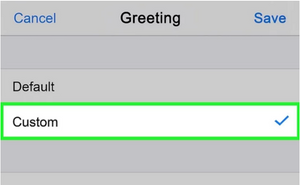
- Now that your iPhone voicemail is set up, you may start using it. So, now finally, you got your answer on how to set up voicemail on iPhone. However, you can also learn more about moving voicemails between Apple services by visiting this page. Voicemails may be sent to others through AirDrop, emailed, or saved as an audio note to conserve storage space. To save a voicemail, choose the message and then select the share option.
Return to the Phone app’s voicemail page and choose Greeting from the drop-down menu in the upper left corner of the screen. Using voicemail is as simple as tapping the red icon when you get an incoming call notification. Pressing the green button, on the other hand, will allow you to answer the phone.
Also read: How to recover deleted Photos from iCloud
How to Change Your Voicemail’s Configuration?
- Make a new introduction: Then choose Greeting from the drop-down menu.
- Change the password for your voicemail: Enter the new password in Settings > Phone > Change Voicemail Password.
- Contact your wireless provider: if you’ve lost your voicemail password.
- You may now set up a notification for a new voicemail: Find Sounds & Haptics or Settings > Sounds.
How To Move A Voicemail From One iPhone to another?
Following these instructions will let you transfer an existing voicemail to your new iPhone.
- Visit Storage & Backup in Settings > iCloud.
- iCloud backup is an option.
- Wait for your iPhone to back up by clicking OK and then sitting back and relaxing.
- Select Restore From iCloud backup on your new iPhone and follow the onscreen instructions.
- Backups will appear in a list. Choose the most recent version.
- It is time to move all of your personal information, including voicemails, to this device.
Alternative Voicemail System


Some phone providers and carriers charge a fee for voicemail, and a voicemail service might result in a game of cat-and-mouse with people trying to call you. Traditional voicemail systems can also take a long time to use since each message must be listened to sequentially, and each message’s caller information and content might take minutes to hours to read.
Many consumers have made a move to visual voicemail because of problems with standard voicemail services. Visual voicemail apps like Vxt allow you to view and prioritize your messages without wasting time listening to every one of them, which is a huge time-saver. To find out the person who left the call, how long the message lasted, or its content, you don’t even need to dial a phone number! Visual voicemail allows you to view messages in any sequence, unlike standard voicemail, which requires you to listen sequentially.
When you use an app like Vxt, you may save time by utilizing features like voicemail transcription, smart greetings for your incoming messages, and a function that lets you transcribe your incoming voicemails and send them directly to email. Vxt and interfaces presently support iOS and Android versions with other helpful tools such as Slack, Salesforce, and Pipedrive through Vxt Web.
It is possible to use Vxt for free with certain limitations. Still, their premium memberships are reasonably priced for small-business owners, sales associates, and those who get a large volume of voicemails. You can see how basic it is to install and begin using Vxt by visiting our setup instructions.
Conclusion
To access your iPhone’s visual voicemail feature, you don’t need to dial a phone number first. This feature provides a visual representation of all of your voicemail messages so that you may pick which ones to listen to or delete based on your preferences and schedules. In some cases, the iPhone’s voicemail-to-text capability may also allow you to view the transcripts of your voicemail messages. To use this useful menu to its fullest potential, you must first learn how to set up voicemail on iPhone correctly. Your visual voicemail messages may be saved as notes or voice memos, and you can even share them using AirDrop or the built-in Apple applications Messages, Mail, and others.