



Most of us have some important data kept on our android devices. Sometimes we have to Factory data reset our phone in order to get rid of some malware, virus attacks, software crashes, and forgotten passwords. It may happen many times that you gave your android device to your child and he or she accidentally factory data reset your phone, or you may hit these settings unknowingly. Factory Reset actually restores the original specified state by the manufacturers in your android device by removing all data, settings, passwords, and applications that the user added to the device. Virus attacks, software crashes, etc., restoring factory settings is a good solution. Although It is a good option and helps in getting rid of these errors. But like data formatting, it also erases complete data on your android device which you don’t want to lose. There are many who don’t have a backup of any sort. Don’t worry you are not alone in this article you will learn how to recover data after factory reset android free.
There are two methods for two different problems. One is for those who already have a backup in any cloud storage or somewhere else, and another one is for those who don’t create any sort of backup. So let us proceed.
Related Post: How to Factory Reset iPhone 6 and Later versions (4 Methods)
Method 1
Recover Data from backup after Factory Reset.


Nowadays, most of people usually keep backups of phone data either on the system or on cloud storage like google drive. If you are one of those who always keep on backing up or regularly syncing your data, it will be very easy to restore your lost data after factory data reset on your Android device.
Now scroll down and learn how to reclaim your data from backup after a hard reset. There are 2 solutions available for those who already have a backup.
1. How to Recover Data after Factory Reset from Google Drive
Related Post: How to Recover Unsaved Word Document (4 Solutions)


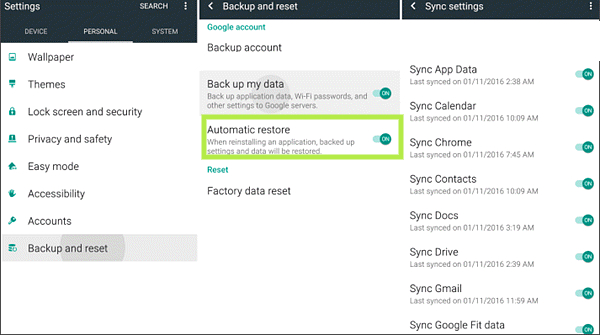
If you have created a backup on google drive and enabled sync of all data just follow these instructions.
- Head to settings and open backup and reset.
- Now push the slider of automatic restore towards the right, and select the files you want to retrieve.

Related Post: HOW TO RECOVER DELETED PHOTOS.
2. Recover data from Mobile’s backup after Factory reset
Many android devices have a default function of creating backups, if your android device has this function and you have backed up your data regularly you can easily recapture all of your lost data.

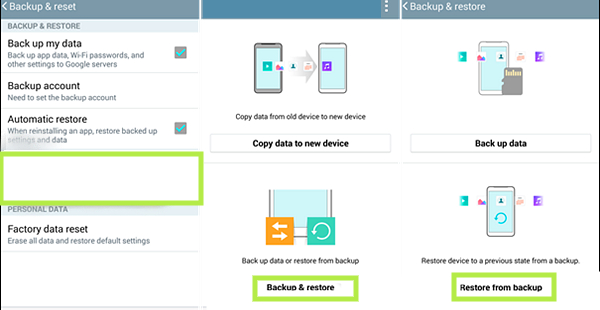
- Head to settings type backup and reset.
- Now, tap on the Your mobile name + backup option that appears in the bottom left.
- Now tap on backup and restore
- Then on restore from backup.
How to restore data after factory reset Android in start
You can also get back your lost data if you have a backup, by this way.
- Turn on your Android device after factory data.
- After tapping on some usual options, an option stating copy apps and data will appear.
- Now tap on Copy your data


- Then enter your wifi network’s password, now an option to Bring your data from will appears.
- Tap on bring your data from the cloud and enter your cloud storage account’s email and password.

- After agreeing to Google’s terms and services select the files you want to restore.


- Now tap on restore to repossess your lost data.
Related post: How to restore deleted WhatsApp messages
Method 2
How to restore data Without a backup for ANDROID:
If you have not created a backup on the phone or cloud storage you can still retrieve your lost data. But for this, you have to use some third-party data recovery tool. Scroll down to see some of the best Data recovery tools for android.
- Gihsoft Android Data recovery.
- Dr.Fone Data recovery (Android)
1. Gihsoft Android Data Recovery:
If you have not created a backup of your files and accidentally or for any reason, you lost your data. Don’t worry Gihsoft Android Data recovery, is one of the best data recovery tools and allows you to recuperate your data seamlessly. Using this app you can restore your lost photos, videos, messages, contacts, and any other document which was previously kept in your android device before the Factory data reset. Follow these steps to restore your data after the Factory data reset without backup.
- First, download Gihosoft Android Data Recovery then install it on your computer.
- Now, run the program and select the type of data you want to restore.
- Now tap on Next.


- Then, connect your Android device to your computer via USB cable and enable USB debugging on your Android device.
- After successful recognition of your phone, now tap on Start to start scanning the device and search for your lost data.
- Once the scanning is completed, you can preview and select the data you want to restore.


- Now, click Recover to recover your lost files from Android after a factory reset. The data will be saved to your computer in a readable format that you have selected to restore.
Related Post: 3 best ways of How To Reopen Closed Tab.
2. Dr.Fone – data recovery (Android)
Dr.Fone – Data Recovery (Android) is designed to give you full control of the repossessing process on your Android mobile phone. With this app, you can easily restore data without backup. This app is also available for Android prior to 8.0. It can easily retrieve your lost phone contacts, all kinds of multimedia files, documents, and lost messages. If you want to know how to restore data after factory data reset on Android without backup, follow this step-by-step tutorial to learn how it works.
- First, download the Dr.Fone Form – Android Data Recovery here https://drfone.wondershare.com/android-data-recovery.html, now install it.
- After installation, open Dr.Fone on your computer and connect the Android device to the USB cable.
- Now, select the data recovery option from the main menu.


- Now, select the data you want to get back. Then tap on Next.

- The tool starts scanning your device to find your files.
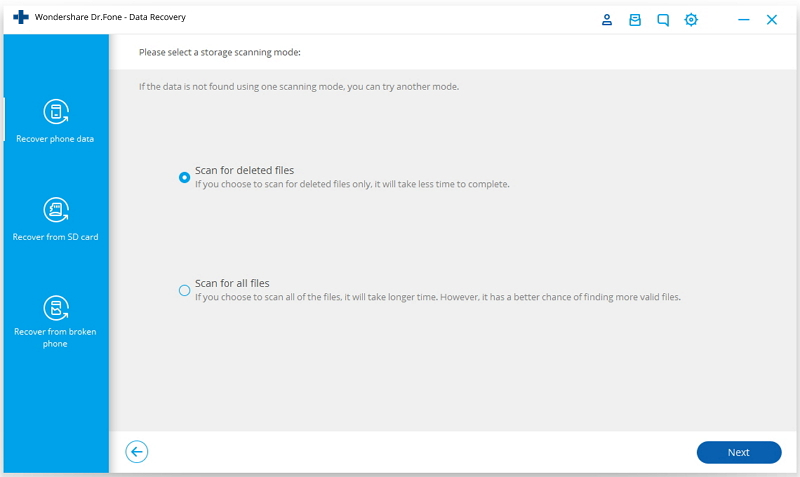
- Once the scanning is completed, now preview and select the files you want to reclaim. Click recover to device.
Bonus tip
In order to avoid this problem in the future enable your all data sync by following these easy steps.
- Open settings and tap on the magnifying glass option.
- Now type backup and tap on that to open backup settings for your Android device.
- Then move the slider to the right to open the switch that appears next to Backup to Google drive. It enables the files to automatically set a backup in google drive.


- Now push the slider switch next to Automatic Restore to enable this setting which retains the settings and data.


- Then tap on the back arrow icon that appears in the upper left corner to return to the previous screen.
- Now tap on the files you want to sync and push the slider next to Backup and sync on the right so that copy of your data is being made on Google drive.


- Then tap on backup now.
Now you know how to recover data after factory reset for android free. If you still have any queries or problems in getting your lost data back, you can ask us in the comment section below.
How to reset factory without losing data in laptop
The reason behind resetting the factory is observing the poor performance of the software for updates and security concerns. Fixing system problems will not get a fix until restarting your laptop. Many laptops lose their data from the resetting factory. Nevertheless, our hack will save your files from discarding.
1. Click on the start menu from the bottom bar line. Select the setting and visit the security and updates page.
2. You will see a reset button from the advanced options section. When your window starts to reset the settings, click the F11 key for the advanced start-up option. This option is technically beneficial to boost the system of your laptop.
3. Switch on winRE mode and tap on troubleshooting. This step might take ten to fifteen minutes to find the exact problem causing issues.
4. It will give the option of keeping files. Please select it and press next and reset.
5. Now, continue the process when a popup note appears informing you about re-installing of windows on your laptop.
Final Words
I hope now you have an idea of How to Recover Data after Factory Reset and now you can easily get back what you lost as your data. If still you face any difficulty in doing so, or you have any query or new method which you want to share with us, you can connect with us in the comment section below.
Thank you.