


There are numerous ways to chat with your friend or to send messages to your friends, but when you’re playing games, Discord is a really innovative platform to get connected with many people around the world and with your friends. However, Discord is not only loved by gamers, it has become one of the most important chatting apps for non-gamers too. As Discord provides text and voice chat servers, it also allows sharing your screen on Discord through the screen sharing feature which has created an opportunity to gather people who love to interact while playing games together. Discord allows its users to communicate with the same group even when other members of the group are not playing a similar game or even when they are not playing any at all. Their main target was to improve functionality as compared to other chat applications. With the passage of time Discord’s users have grown exponentially. For now, Discord provides message boards for many different communities of gamers and non-gamers alike. This app is quite addictive especially when we are talking about gamers. Either you want to delete this app permanently or you just want to switch to another chatting app, you are in the right place for sure. Here in this article, you will see how to delete discord account permanently and how to disable discord account. Let’s proceed.
Delete Discord account permanently:
Related post: How to Share Screen on Discord in 2022!


If you have decided to cut your ties with discord completely, there’s no problem. You just need to confirm some prerequisites before proceeding to completely deleting your discord account. You can easily delete your Discord account if you haven’t created any of your servers. But if you’re a server owner, you need to either transfer your server ownership to someone or you have to delete your server. If you try to proceed without transferring or deleting your server you will see an error message asking you to delete or transfer your server.
1. How to delete a discord server
Follow these steps to easily delete your Discord account. If you want to know how to delete a Discord server, follow these easy steps.
- Run the Discord application on your Pc if you have installed it, if not the open it in your web browser.
- Open the server you have created and want to delete it.
- When you are in your server, tap on the icon of the down arrow right side of the server name.


- Now from the options menu, tap on Server Settings.


- Now tap on the Delete Server option, on the far left in the server menu


- In order to completely delete the server, type the server name then click Delete Server.


2. How to transfer discord server ownership
You might have worked very hard on your discord server and don’t want to delete it, no problem, still, there is away. You can transfer your server ownership to any of your friends. Follow these easy steps to know how to transfer Discord server ownership.
- Sign in to your discord account
- Head to the server you want to transfer ownership to.
- Now tap on the down arrow icon next to the server name to open the server menu.

- Now tap on Server Settings.

- Under User Management category you will find server member option, tap on it to open the list of discord members

Related Post: Custom Skin Compiler For Minecraft Convert Images to skin
- Now, the list of all members will appear. Select any member you want to transfer ownership to, now tap on the three-point icon appears in next to member’s name


- Now go to member settings
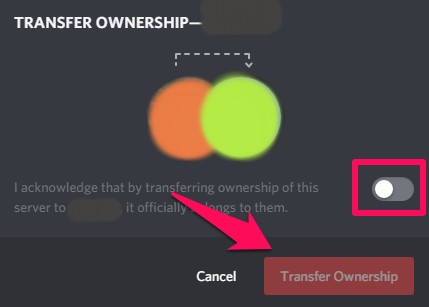
- Now, click on Transfer Ownership of the server

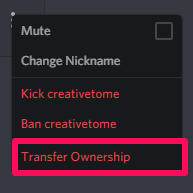
- Turn on the switch bar, then click Transfer Ownership.

Related post: How to delete search history on Facebook messenger.
3. Delete Your Discord Account
Once you’re finished deleting or transferring ownership of the Discord server, now you can easily delete your discord account permanently by following these easy steps.
- First, log in to your Discord account
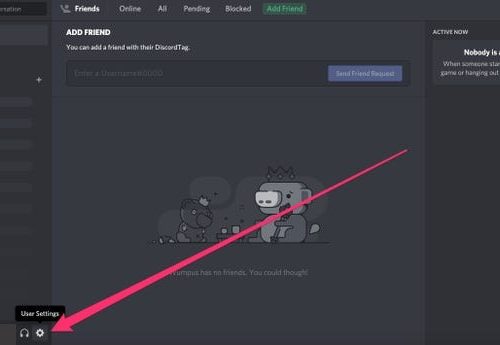
- Now tap on the gear icon below to open the user setting.


- Now, click edit which appears opposite to your username and email


- Next, click Delete account to permanently delete the account.


Related Post: How to delete Telegram Account.
How to disable Discord Account
If you are not sure that all your data If for any reason you want to take a break from your discord account you don’t need to delete it permanently as Discord also allows you to disable your account, just like any other social media platform. Deleting your account means you will never be able to recover it – all your data will be permanently erased. While if you disable your account you can get it back with all your saved data. If you are considering taking a break from discord and having second thoughts that you might come to discord after some time then disabling your account is the best option for sure. to know how to disable Discord Account follow these easy steps:
- Pull out the Discord app to the screen.
- Log in to your account
- Now go to the gear icon which opens up user setting

- Then tap on the My Account tab.

- Now, choose to edit your account.
- Then tap on Disable Account appears on the bottom of your screen, next to Delete Account.

- Now tap on it to disable your account.
Closing thoughts
So, here in this article, we have summed up How to delete Discord Account permanently, How to disable Discord account, How to delete a Discord account server and how to transfer ownership of Discord server. I hope I have cleared every aspect of it. However, if you encounter any problem doing so, feel free to ask your queries in the comment section below.
Thank you