


Avast Antivirus is one of the most popular free antivirus software for windows. It protects windows from many harms but with all of these advantages it sometimes interferes with another program and creates problems. It has a specific Self-defense mode that protects avast from malware when trying to uninstall it, this simply means that you cannot uninstall this software like any other software. However, it does not means you can’t uninstall it. There are two possible ways to uninstall avast antivirus software completely and leave no residue. You can remove any avast product which includes VPN, browser, antivirus, etc. either manually or by using third-party integration. In this article we will discuss different techniques of how to uninstall avast from windows 10 and older versions, So let’s proceed.
4 solutions to Uninstall Avast From Windows 10 & older versions:
How to disable Avast Self-Defense
If you want to completely uninstall this software You have to disable Avast Self-Defense. For this, you have to enter the hidden area from the settings. Follow these easy steps to know how to disable Avast Self-defense
- First, Open Avast and tap on the menu that appears at the top-right corner of the screen.

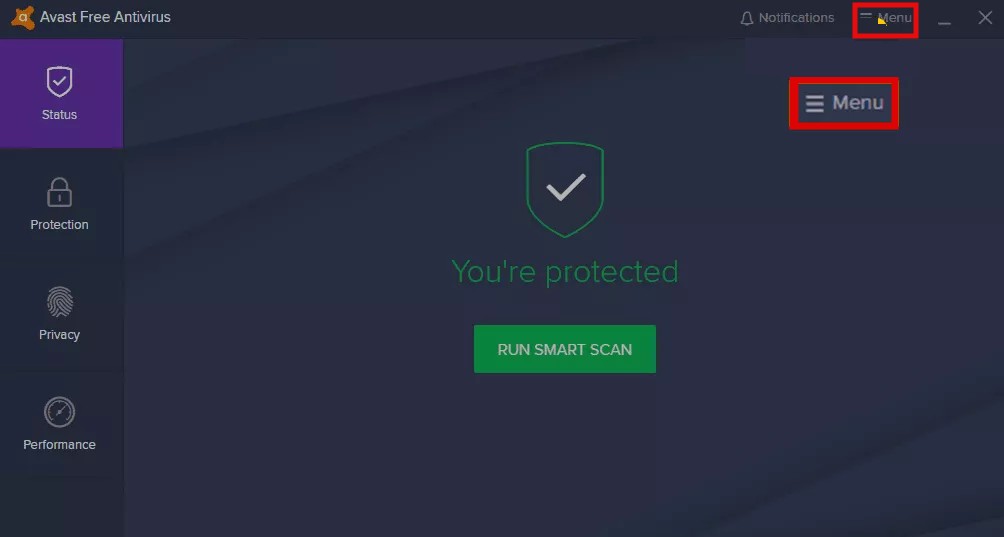
2. Now, select Settings that appear on the dropdown menu. This will take you to the new settings windows.


3. Now, move your cursor to the left navigation pane and select General, then select Troubleshoot that appears on the submenu.


4. Uncheck the box appears next to Enable Self-Defense to disable Self-Defense Mode.


5. Now, you will see a popup asking for confirmation, tap on OK to confirm.


6. Finally, Self-Defense Mode is turned off.
Complete uninstalling Avast Antivirus Software
Once you are done disabling Self-Defense mode of Avast Antivirus, now you can easily uninstall it by following these easy steps.
- Tap on Start menu and type Control Panel.
- Now, tap on the Control Panel app to open it.
- Head to Programs and features in the control panel window.
- Now, scroll down in the Programs and Features window to the Avast Antivirus app and click on it.
- Now, click on Uninstall to proceed with the uninstallation process.


- Once you start the uninstallation process, it will launch the configuration screen where you will see different options like modernization, repair, or modification, that are available to modify your installation.
- You will also see an Uninstall option at the bottom of the screen. Begin the process of uninstalling Avast by click on that Uninstall option.


- A confirmation window will appear asking if you really want to uninstall Avast. Tap on the “Yes” option.

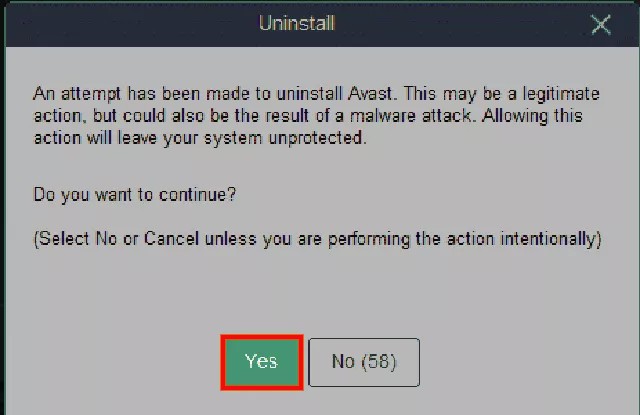
- Once you tap yes, the process of Uninstalling Avast will start.
- The process may take a few minutes to complete as it will delete all Avast files in your system.
- After the uninstallation is completed, a prompt will appear asking to restart your computer.
- Tap on the restart option to finish the uninstallation.

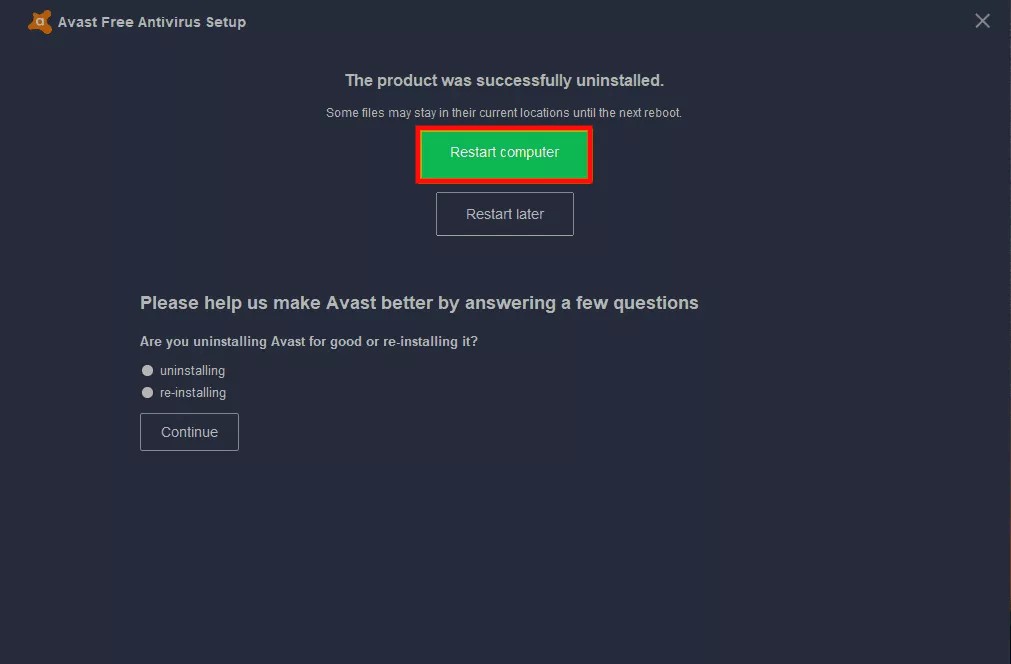
- Once you have to restart your computer, Avast will be completely uninstalled from your pc.
Now come on to the next technique to know about how to uninstall avast antivirus by using the uninstaller.
How to Delete Avast using Avast Uninstaller Utility
- First download avastclear.exe from Avast’s official website.
- Now, open it with the Run as Administrator button.


- Then, restart your windows in safe mode and run the utility in other window. Once you are done locating the avast files (ignore it as default if it is correct), now tap on uninstall.


- The uninstallation process may take a few minutes, wait for it. After the complete restart of your computer.
You can also uninstall avast antivirus using third-party software like Ccleaner, Iobit uninstaller, etc. In this article, we’ll be discussing How to uninstall avast using Ccleaner and IObit.
Uninstall Avast with CCleaner
You may also like: CCleaner VS BleachBit
1. First head to CCleaner and run CCleaner. Now tap on the Tools section, and search for Avast, once you locate it, tap on it.
2. Then, click on the Uninstall option that appears on the right. You will see the Avast configuration screen asking for confirmation to start the uninstalling action.

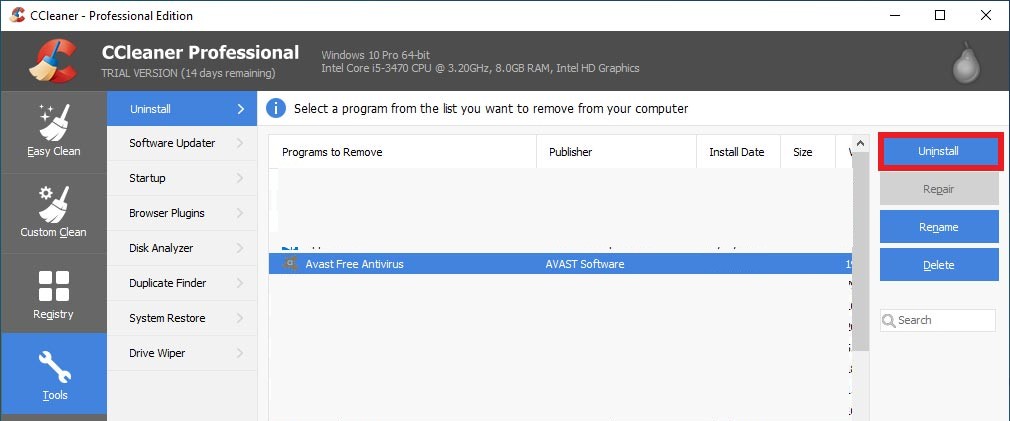
3. Wait for the process to be completed. Now, restart your computer as Avast suggests.
4. Once you have to restarted your pc, now you have to run the CCleaner utility again, then, tap on the registry section.
5. Now, select the Scan for Issues option and then select Fix selected Issues.

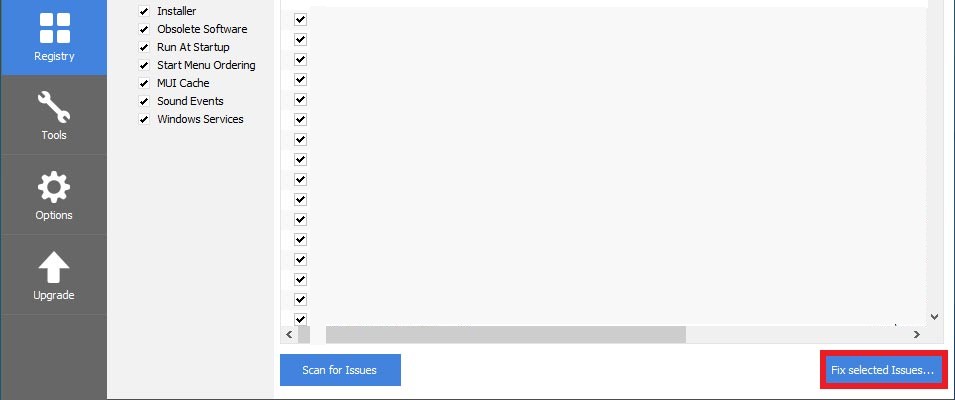
That’s it, now you have completely uninstalled Avast Antivirus software.
Uninstall Avast with Iobit
You can also use IObit Uninstaller as a replacement for CCleaner. This is one of the best uninstallers that remove programs with the registry entries and files.
- First, download the IObit and install the latest version from the official website.
- Now, run IObit, then go to all programs and search for Avast Free Antivirus, Select it and tap on uninstall.

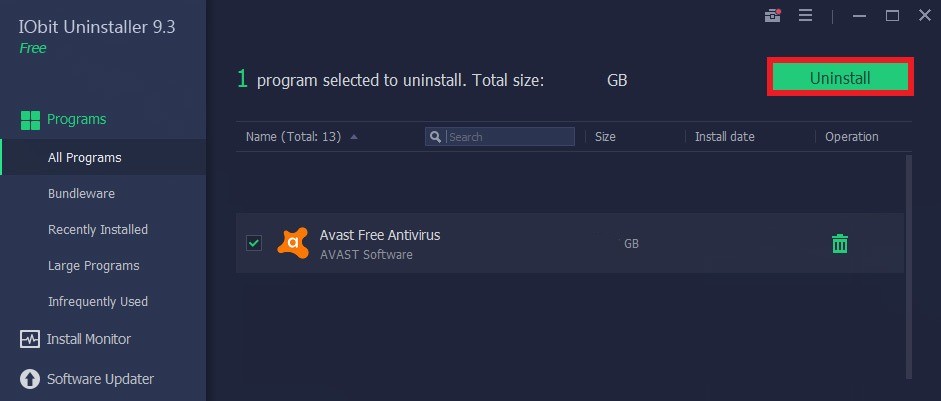
- You will see a pop-up window asking for confirmation. Confirm it to start the uninstallation process. It may take few minutes to complete the process.


- Now, restart the computer. IObit will ask for confirmation. Select yes to completely uninstall the Avast Antivirus.
I hope now you know how to uninstall Avast antivirus software. However, if you face any difficulty in doing so you can connect with us in the comment section below.