


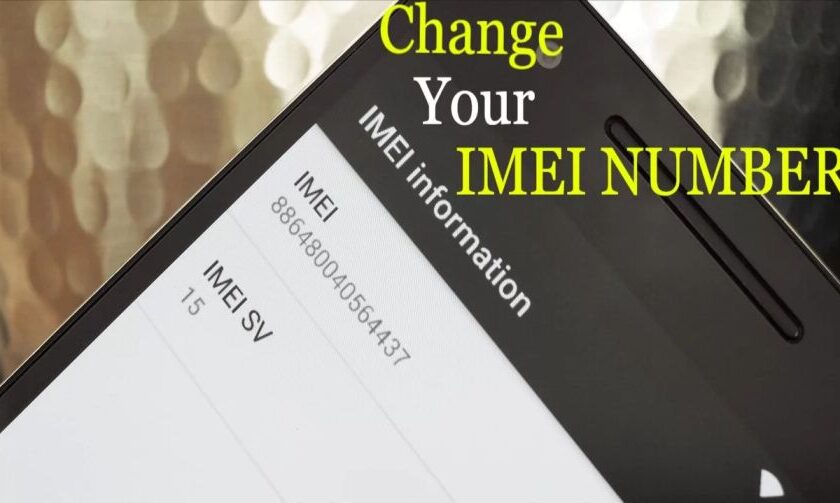
Are you looking for a way to change the IMEI number of your Android device? Well, you’re in luck because, in this article, we will provide you with a step-by-step guide on how to change the IMEI number on Android and iPhone devices easily. But first, let’s understand what an IMEI number is.
- Understanding IMEI Number
- Why Change IMEI Number?
- How to Change IMEI Number on Android Without Root
- Best Apps to Change IMEI numbers On Your Android Device
- How to change IMEI number on rooted android
- Change IMEI number on iPhone (without jailbreak)
- How to Find IMEI Number On Android and On iPhone – Through Settings
- Final words
- FAQs about Changing IMEI Number:
Understanding IMEI Number
IMEI or International Mobile Equipment Identity is a 15-digit serial number that gives a unique identification to mobile phones. This IMEI number is used to identify a device using cellular networks, i.e. mobile data network providers. You can find the IMEI number under the battery, and also on your phone’s box too. With the help of a unique identifier called the IMEI number, all smartphones are trackable and can be located. This unique identity of Mobile helps in conditions like if your mobile phone has been stolen or you lost it somewhere you could ask the network provider to blacklist the numbers.
Changing the IMEI number of an Android phone is generally not feasible as it is a unique identifier for every mobile device. Additionally, tampering with the IMEI number is illegal in many countries. If you need guidance on modifying the IMEI number of your Android phone, it’s prudent to exercise caution and seek professional support.
There are users who want to test specific features and applications which is why they want to change their device’s IMEI number too. Depending on the single or dual sim a mobile phone can have one or two IMEI numbers. There are different ways for android and iOS devices to change IMEI numbers. We will discuss both topics separately. Let us start.
CAUTION!
- Once you have changed the IMEI number of your device, your device cannot be tracked if stolen or lost.
- Changing the IMEI number is illegal in many countries, check out your country’s telecom policy.
- We don’t support the changing of IMEI and this article is only for KNOWLEDGE purposes.
Why Change IMEI Number?
There are several reasons why you might want to change the IMEI number on your Android device. For instance, if your device is blacklisted, changing the IMEI number can help you bypass the blacklist and use the device normally. Additionally, some apps and services might require a unique IMEI number to function properly, and changing the IMEI number can help you access these services.
Pros Of Changing IMEI:
- One of the key benefits of regularly changing the International Mobile Equipment Identity (IMEI) number on your Android device is that it becomes untraceable, making it difficult for someone to track your device. By changing the IMEI number, you are assigning a new unique identity to your device, which is not linked to any previous activities associated with the previous IMEI.
- Occasionally, older Android devices may not be able to receive the latest operating system updates, due to their outdated model. However, changing the IMEI number to a newer model can allow you to enjoy the latest operating system updates by resetting, fixing, and refreshing your Android device.
- Additionally, changing your IMEI number can help you resolve invalid IMEI-related issues such as lost or invalid IMEI numbers. Once you change your IMEI, your Android device will function as if it’s brand new, with all the same features and benefits.
Cons Of Changing IMEI:
- While changing the IMEI number can help protect your privacy and make your device untraceable, it also comes with its own set of disadvantages. Once you change the IMEI number, it becomes difficult to track your device in the future, and if it gets stolen, you may lose it forever.
- The vendor will record the original IMEI number on your receipt when you purchase your device, and if you change the IMEI and lose the device, you may not be able to make a claim for it legally, as you have effectively relinquished ownership of the device by altering its IMEI number.
- It’s essential to note that changing your device’s IMEI number may be illegal in some countries, and it’s crucial to check whether it’s legal in your area before attempting to do so. While it may be legal in some regions of Africa and Asia, it’s illegal in most European countries.
How to Change IMEI Number on Android Without Root
You can change your IMEI on Android without rooting, easily. But this will erase your complete data from your device so be sure to make a complete backup of your data.
- First, open the settings on your Android device.
- Find and tap on backup and reset.
- Now, search for Factory Data Reset in the following list and click on it.


- Now, you will get a notification.
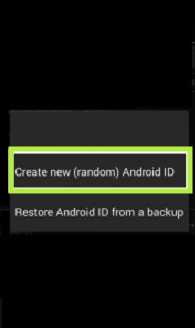
- Tap on Create new (random) Android ID.

Gaming needs a lot of dedication plus the right equipment, Here we have listed some of the best gaming mice under $50 to level up your gaming experience.
Best Apps to Change IMEI numbers On Your Android Device
If you don’t want to erase your complete data while changing your Android device IMEI you will need a third-party IMEI changer for Android. Here we have listed some of the best IMEI changers for Android. We have listed the 3 best apps to change Android IMEI below based on the level of complexity and effectiveness.
1. XPOSED IMEI Changer Pro

This Android IMEI Changer app allows the user to change the IMEI identification number of their device. It generates random IMEI numbers every time the app is used. However, it also allows users to type a new IMEI number if they have any specific one in their mind. This app is very easy to use having a very simple UI. In order to change your IMEI using this app, you only need to click the “Apply” option and then restart your device.
For detailed steps follow the below-mentioned steps to use Xposed Framework:
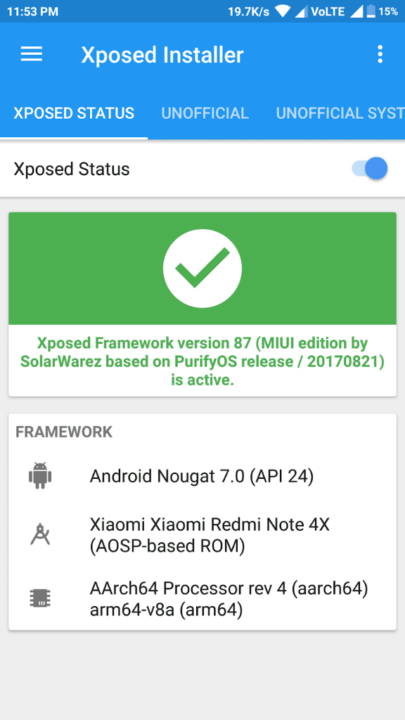
- Root your Android device and install Xposed Framework
- Download and install the “IMEI Changer” module from Xposed Installer
- Open the “IMEI Changer” app and enter the new IMEI number you want to use
- Reboot your device, and the new IMEI number should be active
2. MTK Engineering Mode


MTK Engineering Mode is another app that has a very clean interface for users that can change their IMEI number easily. It was specifically made for Taiwanese device manufacturers like Tecno, Infinix, Elephone, Oppo, etc. However, it also works on non-Taiwanese manufacturers.
Change IMEI Using Terminal Emulator
If you prefer using the command line, you can change the IMEI number on your Android device using Terminal Emulator. Here’s how to do it:
- Root your Android device and install Terminal Emulator
- Open Terminal Emulator and enter the following command: “su”
- Enter the command “echo ‘AT+EGMR=1,7,”IMEI_NUMBER”‘ >/dev/pttycmd1” (replace “IMEI_NUMBER” with the new IMEI number you want to use)
- Reboot your device, and the new IMEI number should be active
Cookies can be helpful for your surfing experience but sometimes they could harm your data security. However, I have listed some easiest steps to clear cookies.
How to change IMEI number on rooted android
Before changing your IMEI number you have to make sure your Android device is rooted and you have installed the Xposed framework.
How to root an Android device?
Rooting an Android device is not as easy as you have to deal with many Android files simultaneously, which is not easy for a layman. You can root your device manually without the need for a third-party app. There are many applications using which you can easily root your Android device with or without a computer. MAGISK is one of those best apps that help you root your Android device with ease.
Related Post: How to change your iPhone Name
Steps to change the IMEI number:
By using the following method you can change IMEI number of all Android versions, even on Android Pie. Now proceed to the steps.
- First, copy the original IMEI number of your mobile phone so that in the future if you need it you can easily get it.
- You can find the original IMEI of your device by dialing *#6# on the dial pad or you can also find the original IMEI of your mobile device in settings.


- Once you are finished copying the original IMEI, then open the already installed Xposed app on your Android device.
- Now, go to Modules and tap on IMEI Changer.

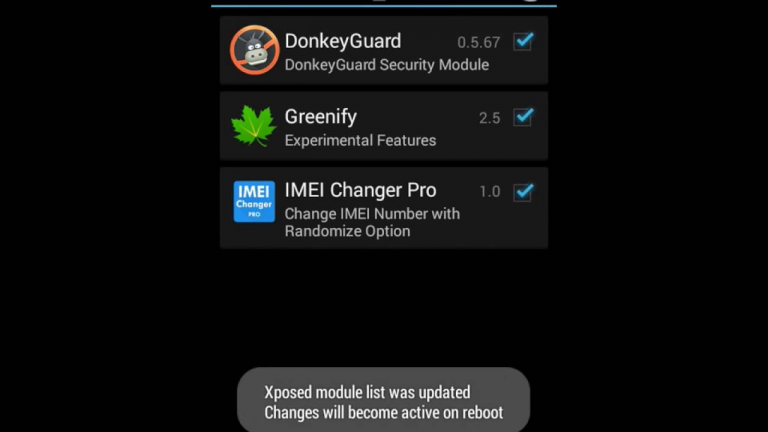
- Now, restart your Android device.
- You can also soft reboot from the Xposed installer if you want to fast restart your Android device.
- Once your Android phone is restarted, open IMEI Changer. Your Real IMEI number will also be shown in the current IMEI option.
- Now, you can change your IMEI Number to a new number by clicking the new IMEI number option.

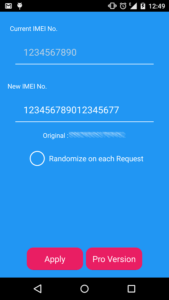
- Then, click on Apply.
- Now your IMEI number is converted into your new IMEI number which is shown in the current IMEI number box.
- If you want to reconfirm.
- Then Reboot your device and dial *#6# to check your IMEI number.
Change IMEI number on iPhone (without jailbreak)
According to software editors and developers, iOS is one of the most rigid operating platforms that does not allow its users to modify its software and applications. Most iPhone users fear the performance of jail-braked iPhones. Though there are many latest ways to perform jailbreak for the latest unknown version of iOS it voids the warranty of an expensive Apple device. Features of an iOS device are also very restricted as compared to an Android device. In these types of conditions, you have no choice but to use a third-party app to change the IMEI of your device.
There is a tool in your computer named Ziphone that helps in changing the IMEI number of an iOS device without jailbreaking, The steps to know how to change the IMEI number on an iPhone or iOS device using the Ziphone are as follows.


- First, open your dial pad and dial *#06#
- Now copy the original IMEI number for your device so it would be safe if you need it in the future.
- Now download the Ziphone tool on your computer.


- Then enable your iPhone’s recovery mode by pressing and holding the chip and power buttons.
- Now connect your phone to the computer via cable.
- Now, open the Ziphone folder on your computer.
- Then press the shift + right mouse button.
- Now type “Ziphone” in the command window, and press Enter.
- Type this in the command window Ziphone -u -i a123456789012345 (instead of this “123456789012345” type a new 15-digit IMEI number) and press enter.
- Now you can check your new IMEI number by calling *#06#
While the world is moving toward the metaverse, have you ever wondered how VR works?
How to Find IMEI Number On Android and On iPhone – Through Settings
Understanding the IMEI of your Android or iPhone device holds great significance for several purposes, including device registration, reporting it in case of theft or loss, warranty verification, and ensuring its authenticity.
By following the methods described below, you will be able to easily retrieve your device’s unique IMEI number
Finding the IMEI on an Android Device
Step 1: Navigate to the “Settings” Menu Unlock your Android device and access the home screen. Look for the “Settings” icon, usually represented by a gear-shaped symbol, and tap on it. This will take you to the device settings.


Step 2: Locate the “About Phone” or “About Device” Option Scroll down the settings menu until you find the option labeled “About Phone” or “About Device.” Tap on it to access additional device information.
Step 3: Find the IMEI Number In the “About Phone” or “About Device” section, you will see various details about your device. Look for the “IMEI” or “IMEI number” entry. The IMEI number is usually a 15-digit code. You can either note it down or take a screenshot for future reference.
Finding the IMEI on an iPhone
Step 1: Open the “Settings” App Unlock your iPhone and locate the “Settings” app on the home screen. It is represented by a gear-shaped icon. Tap on it to open the settings menu.
Step 2: Access the “General” Settings Scroll down the settings menu and tap on the “General” option. This will bring up a list of general device settings.
Step 3: Locate the “About” Section Within the “General” settings, you will find an option called “About.” Tap on it to access detailed information about your iPhone.
Step 4: Find the IMEI Number In the “About” section, you will see various details about your iPhone, including the IMEI number. Look for the entry labeled “IMEI” or “IMEI number.” The IMEI number is typically a 15-digit code. You can either make a note of it or capture a screenshot for future use.
Final words
Changing the IMEI number on a mobile phone can be a complicated process, and it’s important to understand the potential risks and benefits before proceeding. We hope this article has provided you with a comprehensive guide on how to change the IMEI number on Android and iPhone, along with the recommended precautions and best practices to ensure a safe and successful process.
If you face any problem doing this you can connect with us via the comments section below.
FAQs about Changing IMEI Number:
You have to check How to change the IMEI numbers of Android and iPhone with or without the root above in this article.
Yes, it is subjected to as a criminal offense in several countries, always take a look at your country’s Telecom Policy.
Xposed and MTK engineer mood are some of the Software that can change the IMEI of your device.
No, you cannot change the IMEI number of any device. Some devices have a locked bootloader, which means that you cannot change the IMEI number. Additionally, some countries have laws against changing IMEI numbers, so it is important to check your local laws before attempting to change the IMEI number.
Changing the IMEI number of your device can void the warranty, and it may also cause issues with your carrier. Additionally, some apps may not work correctly if they detect that your device has a changed IMEI number.